.svg)
Important: Creator Analytics by CreatorDB currently only supports YouTube, Instagram, and TikTok.
-
Open Chrome.
-
Go to a supported social media platform.
-
Click the CreatorDB icon.
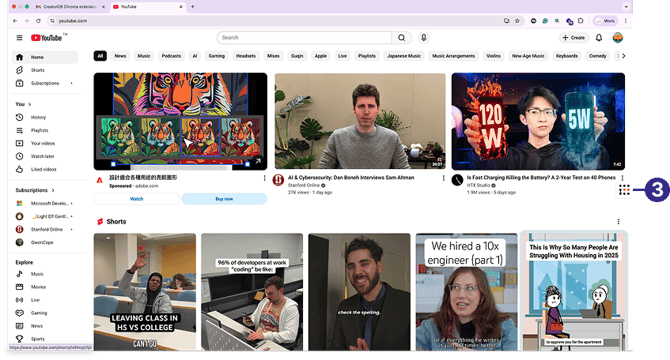
-
Log in to your CreatorDB account.
-
Click your profile picture.
A drop-down menu appears..png?width=670&height=368&name=Group%205%20(1).png)
-
Perform any of the following tasks:
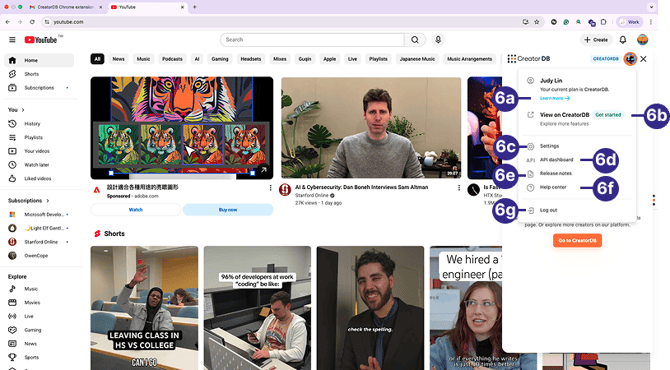
Callout Task Actions a View plan details. Click Learn more→. b Open the CreatorDB web platform. Click View on CreatorDB. c Configure account settings. Click Settings.
The Account page appears.
For details, see Account Management in the CreatorDB User Guide.d View API dashboard. Click API dashboard.
The API dashboard page appears. For details, see Managing API credits in the CreatorDB User Guide.e View release notes. Click Release notes.
The CreatorDB Product Updates & Release Notes page appears.f Go to Help Center. Click Help Center.
The CreatorDB Knowledge Base page appears.g Log out of account. Click Log out.