.svg)
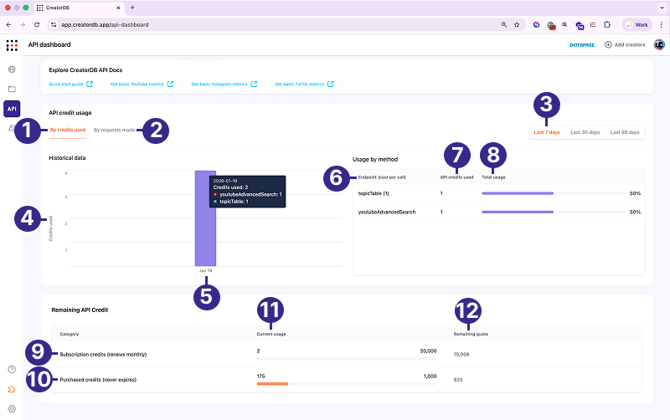
API credits are required to integrate CreatorDB data with your application or download the database data for further analysis. Based on your CreatorDB subscription plan, you will get a specific number of free API credits that renew each month. You can purchase additional API credits when you exceed your free API credit quota by contacting CreatorDB. Purchased API credits expire upon usage and can be carried over to the next billing cycle. You can view the following API credit usage data by going to API > API dashboard.
| No. | Label | Description |
|---|---|---|
| 1 | By credits used | Shows API credit usage data by the number of credits used to make calls to the CreatorDB API server. |
| 2 | By requests made | Shows API credit usage data by the number of API requests made to the CreatorDB API server. |
| 3 | Period | Select a tab to specify the period of API data usage. You can view the data by 7 days, 30 days, or 90 days. |
| 4 | Metrics | Displays the specified API usage metrics, for example the API credits used or number of requests made. |
| 5 | Date | Shows up to a maximum of 90 days. |
| 6 | Endpoint | The CreatorDB API that you have called. The API credits used for the call are shown in parentheses “()”. |
| 7 | API credits used | The number of API credits used to call the CreatorDB API. |
| 8 | Total usage | Shows the percentage of API credits an API endpoint uses. |
| 9 | Subscription credits | The API credits included in your CreatorDB plan. Any unused subscription API credits expire at the end of the month, and this API credit quota renews every month. |
| 10 | Purchased credits | Any extra API credits you have purchased on top of your API subscription credits. Purchased API credits expire upon usage. |
| 11 | Current usage | Shows the API credits you have used. |
| 12 | Remaining quota | Shows the remaining API credits in your account. |