User interface
Familiarize yourself with the CreatorDB user interface to quickly access key app features.
The CreatorDB user interface comprises three main navigation panels: the top navigation bar, the left navigation bar, and the side panel. The navigation bars provide shortcuts to the main CreatorDB features and settings.
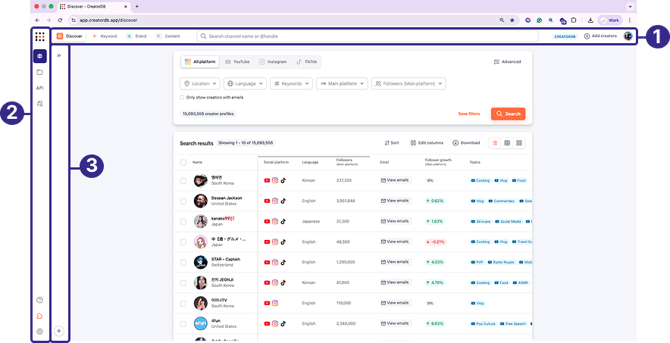
| No. | Description |
| 1 | Top navigation bar |
| 2 | Left navigation bar |
| 3 | Side navigation panel |
By default, the system will load the Discover search page.

| No. | Label | Description |
| 1 | Discover | Search for creators using pre-defined filters in Discover search. |
| 2 | Keyword | Search for creators using pre-defined keywords. |
| 3 | Brand | Search for brands that have sponsored creators. |
| 4 | Content | Search for creators by uploaded content. |
| 5 | Search bar | Search for creators by entering their username or channel name. |
| 6 | CreatorDB plan | Shows your current CreatorDB plan tier. |
| 7 | Add creators | Add new creators to the CreatorDB database. |
| 8 | Account settings | Your user profile picture and shortcut to account settings. You can change your account settings or log out from the CreatorDB app. |
Left navigation bar
.png?width=67&height=309&name=Group_249_(1).png)
| No. | Label | Description |
| 1 | Discover search | Search for creators in the CreatorDB database by pre-defined filters, keywords, brands, or content. By default, the system will load the Discover search page. |
| 2 | Group | Manage creators in groups. |
| 3 | API | Links to the API dashboard. You can check your API credit usage status. |
| 4 | Brand scan | Scan creators previous sponsorship history to find out which brands creators are frequently working with. |
| 5 | Help center | Links to CreatorDB's knowledge base, where you can look up answers to frequently asked questions and common app operations. |
| 6 | Browser extension | Links to the download page for the Chrome Extension, Creator Analytics by CreatorDB. For details, see Creator Analytics by CreatorDB User Guide. |
| 7 | Settings | Links to account settings, where you can change your username, reset passwords, language settings, or get your API key. |
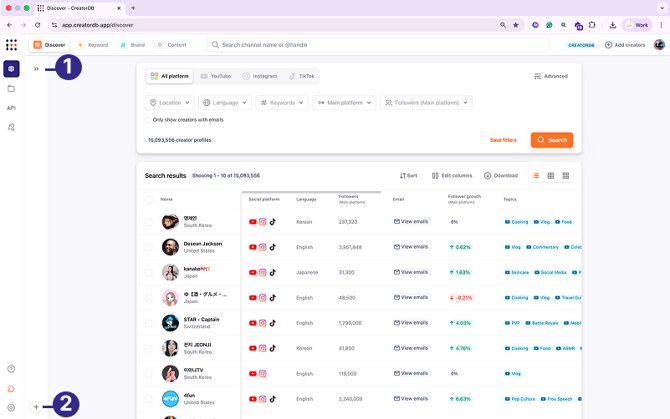
Side navigation panel

| No. | Description |
| 1 | Hide or show side navigation panel |
| 2 | Add filter |

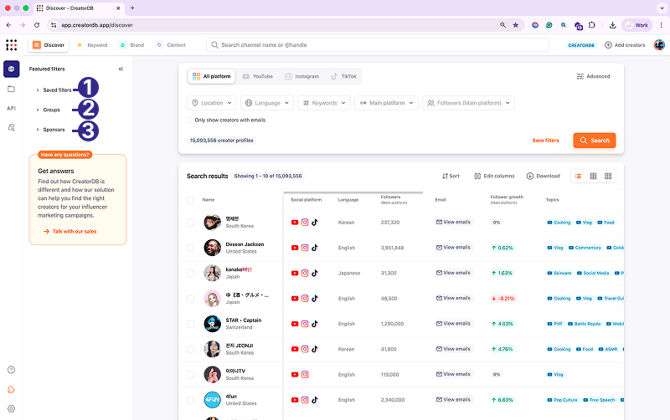
| No. | Label | Description |
| 1 | Saved filters | Manage saved search filters. You can add new filters, duplicate, rename, or delete filters. |
| 2 | Groups | Add or remove creators in groups as search conditions. |
| 3 | Sponsors | Add brand search criteria as search conditions. |