.svg)
Important: Creator Analytics by CreatorDB currently only supports YouTube, Instagram, and TikTok.
Note: Creator Analytics by CreatorDB only shows a creator's available social media platform data. For example, if a creator does not have a TikTok account, that tab option and related statistics will be unavailable.
-
Go to a supported social media platform.
-
Click the CreatorDB icon.
- Open Chrome.
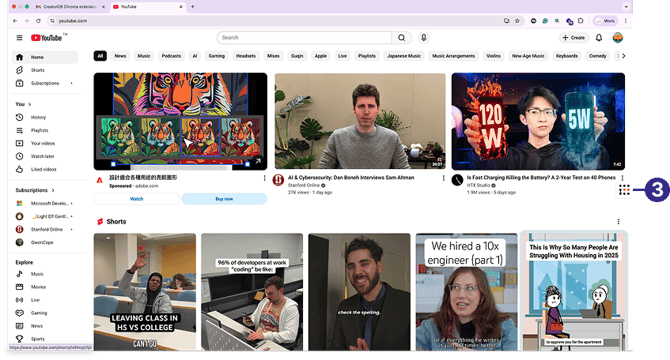
-
Log in to your CreatorDB account.
-
Go to a creator’s account or channel.
Tip: If the Creator Analytics by CreatorDB fails to update data when you switch to another creator’s account, try closing the extension and opening it again.
Note: It may take a few seconds for Creator Analytics by CreatorDB to load a creator’s data.
The following creator information is shown:
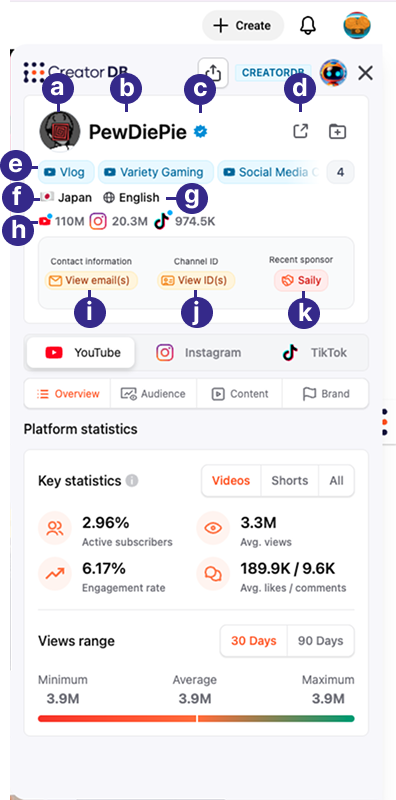
| Callout | Description |
|---|---|
| a | Creator’s profile picture |
| b | Creator name |
| c | Verification badge |
| d | Link to CreatorDB web platform |
| e | Topics |
| f | Country |
| g | Language |
| h | YouTube subscribers, Instagram followers, or TikTok followers |
| i |
Contact information Tip: Click View email(s) to view the creator’s email addresses. Note: This feature is unavailable in the Free plan. To upgrade from the Free plan, please visit CreatorDB’s Pricing page. |
| j |
Channel ID Tip: Click View ID(s) to view the creator’s social media IDs. |
| k | Recent sponsor Tip: Click the brand name to visit the sponsor’s website. Note: This feature is unavailable in the Free plan. To upgrade from the Free plan, please visit CreatorDB’s Pricing page. |