.svg)
To help you find the best creator for online collaborations and campaigns, CreatorDB offers key insights into a creator’s content performance, growth rates, and more. CreatorDB collects publicly available data regularly and directly from the source platforms, then uses AI, ranking algorithms, and other statistical methods to provide insights and add more critical context about the creator and their content. Several key indicators include the CreatorDB score, which provides an overview of key performance indicators, such as engagement rate, follower growth, upload time, and more.
- Key indicators and definitions
- Overview
- Platform statistics
- YouTube
- TikTok
Key indicators and definitions
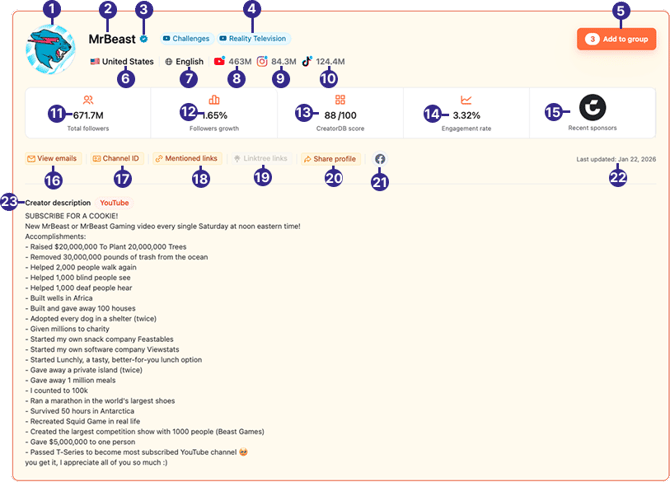
| No. | Label | Definition |
|---|---|---|
| 1 | Profile picture | The creator’s profile picture. |
| 2 | Creator name | The creator’s name or username. |
| 3 | Verification badge | Badge that indicates the creator has been verified by social media platforms, such as YouTube, Instagram, or TikTok. |
| 4 | Topics | The main topics of the creator’s content. |
| 5 | Add to group | Adds this creator to an existing group or a new group. |
| 6 | Location | The creator’s location. |
| 7 | Language | The creator’s spoken language. |
| 8 | YouTube subscribers | The creator’s total number of YouTube subscribers. |
| 9 | Instagram followers | The creator’s total number of Instagram followers. |
| 10 | TikTok followers | The creator’s total number of TikTok followers. |
| 11 | Total followers | The total number of followers is calculated by adding the creator’s followers on YouTube, Instagram, and TikTok. |
| 12 | Followers growth | The monthly follower growth rate of the creator’s main platform. A negative value indicates a decline. |
| 13 | CreatorDB score | An indicator that shows the creator’s overall performance on social media platforms based on the following six indicators: subscriptions, average views, engagement rate, subscription growth, average views growth, and engagement growth rate. The raw score is calculated by adding the six indicators and then finding the average compared to all other creators on social media platforms. The score range is on a scale from 0 to 100. |
| 14 | Engagement rate | The engagement rate of the creator’s main platform is displayed. The engagement rate is an indicator that shows how viewers interact with the content. |
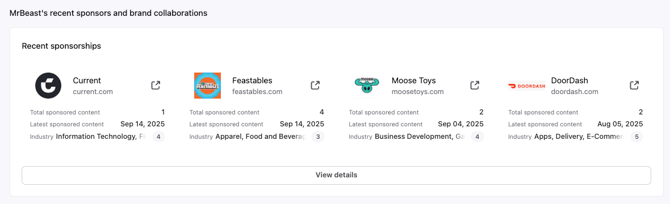
| 15 | Recent sponsors | The latest brands to sponsor the creator’s content. |
| 16 | View emails | The creator’s email contact. |
| 17 | Channel ID | The creator’s YouTube channel or account ID. |
| 18 | Mentioned links | Links found in the creator’s profile. |
| 19 | Linktree links | The creator’s Linktree links. |
| 20 | Share profile | The link for sharing the creator’s profile with others. |
| 21 | Other social media accounts | The creator’s other social media accounts. For example, Mr. Beast also has a Facebook account. |
| 22 | Last updated | The most recent time the system updated the creator’s profile. |
| 23 | Personal description | The creator’s channel or account description. |
Note: When buttons such as View emails, Mentioned links, or Linktree links are grayed-out, it indicates the specific creator data is unavailable.
Overview
The All platforms page on Overview lets you view the creator's overall performance on major social media platforms, including YouTube, Instagram, and TikTok. It also allows you to view key performance indicators at a glance.
Platform statistics
On the All platforms page, you can view the summary of the creators social media performance on multiple platforms. Note that this page only displays information from platforms where the creator has an account, and in this example we will look at a creator whose primary account is on TikTok. Aside from a few exceptions, all data is automatically collected from the relevant platform.
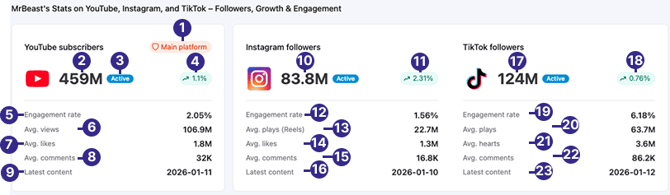
| No. | Metric | Definition |
|---|---|---|
| 1 | Main platform | A label that shows the creator’s primary social media platform. |
| 2 | Total YouTube subscribers | The total number of YouTube subscribers this creator’s channel has. |
| 3 | Active | A label that shows which social media platforms this creator has been actively posting content on over the last 30 days. |
| 4 | Monthly YouTube subscriber growth rate | This creator’s YouTube channel’s subscriber growth rate over the last 30 days. |
| 5 | Engagement rate (YouTube) |
YouTube engagement rate is calculated as follows: (Likes + Comments)/Views |
| 6 | Avg. views | The average number of views YouTube videos received over the past month. |
| 7 | Avg. likes | The average number of likes the creator’s videos received on YouTube. |
| 8 | Avg. comments | The average number of comments the creator’s videos received on YouTube. |
| 9 | Latest content (YouTube) | The latest date the creator uploaded content to YouTube. |
| 10 | Total Instagram followers | The total number of Instagram followers this creator’s account has. |
| 11 | Instagram follower growth rate | This creator’s Instagram account’s follower growth rate over the last 30 days. |
| 12 | Engagement rate (Instagram) | Instagram engagement rate is calculated as follows: (Likes + Comments)/Followers |
| 13 | Avg. plays (Reels) | The average number of plays the creator’s Instagram reels received. |
| 14 | Average likes |
The average number of likes for each Instagram post. |
| 15 | Average comments (Instagram) | The average number of comments for each Instagram post the creator posted. |
| 16 | Latest content (Instagram) | The latest date that the creator posted content onto Instagram. |
| 17 | Total TikTok followers | The total number of followers the creator’s TikTok account has. |
| 18 | TikTok follower growth rate | The creator’s TikTok account’s followers growth rate over the last 30 days. |
| 19 | Engagement rate (TikTok) | Used to measure followers’ interaction with content created by creators or influencers. TikTok engagement rate is calculated as follows: (Hearts + Comments + Shares)/Plays |
| 20 | Avg. plays |
The average number of plays the creator’s videos received on TikTok. |
| 21 | Average hearts | The average number of hearts received by the creator’s TikTok videos. |
| 22 | Average comments (TikTok) | The average number of comments received by the creator’s TikTok videos. |
| 23 | Latest content (TikTok) | The latest date the creator posted content onto TikTok. |
Note: All units are measured by the thousands (k=1,000) or millions (M=1,000,000).
Creator overview
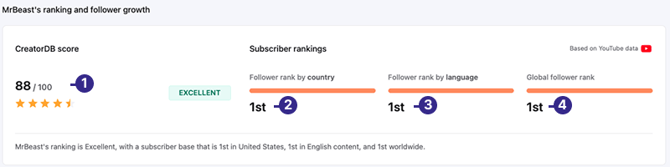
| No. | Metric | Definition |
|---|---|---|
| 1 | CreatorDB score | A unique score is calculated by adding subscriptions, average views, engagement rate, subscription growth, average views growth, and engagement growth rate and finding the median value. The score ranges from 0 to 100. |
| 2 | Follower rank by country | The creator's followers' national rankings compared to other creators from the same country in the CreatorDB database. |
| 3 | Follower rank by language | The creator's followers rank by language compared to other creators from the same language in the CreatorDB database. |
| 4 | Global follower rank |
The creator's global rankings for total followers compared to other creators in the CreatorDB database. |
CreatorDB score metrics
.png?width=286&height=129&name=Group_290_(1).png)
| Stars | Score range |
|---|---|
| 0 stars | 0 |
| 0.5 stars | 1 to 10 |
| 1 star | 11 to 20 |
| 1.5 stars | 21 to 30 |
| 2 stars | 31 to 40 |
| 2.5 stars | 41 to 50 |
| 3 stars | 51 to 60 |
| 3.5 stars | 61 to 70 |
| 4 stars | 71 to 80 |
| 4.5 stars | 81 to 90 |
| 5 stars | 91 to 100 |
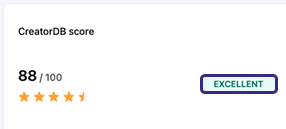
| Ranking description | Score range |
|---|---|
| Poor | 0 to 25 |
| OK | 26 to 50 |
| Good | 51 to 65 |
| Great | 66 to 80 |
| Excellent | 81 to 90 |
| Superb | 91 to 100 |
Follower metrics
The follower metrics are updated daily and show a line graph over 90 days. On the All platform page, the line graph shows changes in follower growth on YouTube, Instagram, and TikTok. The Total follower growth indicators over 7 days, 30 days, and 90 days data are from the main platform where the creator is most active.
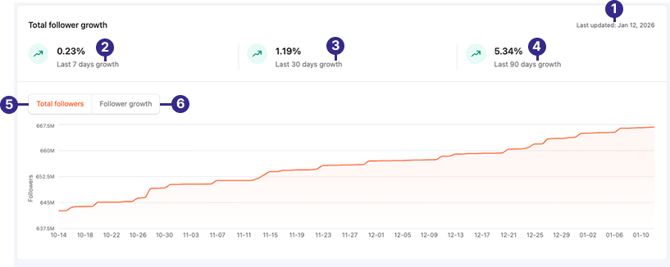
| No. | Metric | Definition |
|---|---|---|
| 1 | Last updated | The last date the system updated this creator’s total follower growth data. |
| 2 | Last 7 days growth | The total follower growth rate over the last 7 days (about 1 week). |
| 3 | Last 30 days growth | The total follower growth rate over the last 30 days (about 1 month). |
| 4 | Last 90 days growth | The total follower growth rate over the last 90 days (about 3 months). |
| 5 | Total followers | The number of followers changes over 90 days. |
| 6 | Follower growth | The creator’s total follower growth rate over one year. By default, CreatorDB shows the changes over 7 days, 30 days, and 90 days. The graph shows follower growth numbers on the creator’s YouTube, Instagram, and TikTok accounts. |
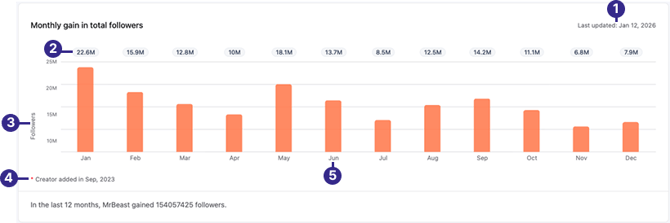
| No. | Metric | Definition |
|---|---|---|
| 1 | Last updated | The last date the system updated the monthly gain in followers data. |
| 2 | Monthly gain in total followers | Shows the gain in total followers for that month. |
| 3 | Followers | The change in number of followers gained per month. |
| 4 | Creator added in | The date the system added this creator to the CreatorDB database. |
| 5 | Months | The months over one year. |
Note: All units are measured by the thousands (k=1,000) or millions (M=1,000,000)
Upload time (heat map)
The upload heat map indicates when a creator publishes the most recent 20 posts or videos. The heat map shows four periods throughout the day through the week that the creator uploads content and shows how frequently creators upload content. Note that the times are in the creator's local time zone.
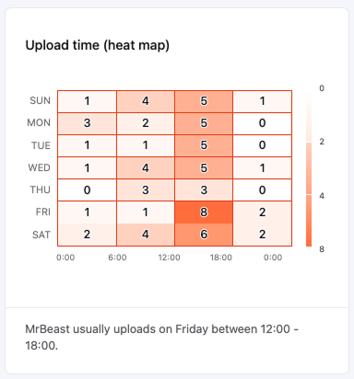
| Time period | Time range |
|---|---|
| Night | 0:00-6:00 |
| Morning | 6:01-12:00 |
| Afternoon | 12:01-18:00 |
| Evening | 18:01-24:00 |
Content breakdown
The content breakdown shows the most recent 20 posts by social media platform over 3 months. You can view the content breakdown by the content types or by platform.
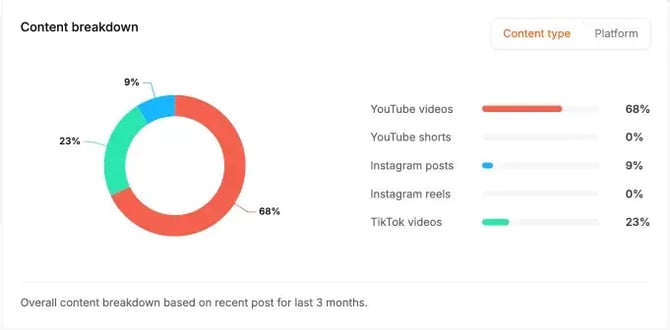
| Platform types | Content types |
|---|---|
| YouTube | YouTube videos, YouTube shorts |
| Instagram posts, Instagram reels | |
| TikTok | TikTok posts |
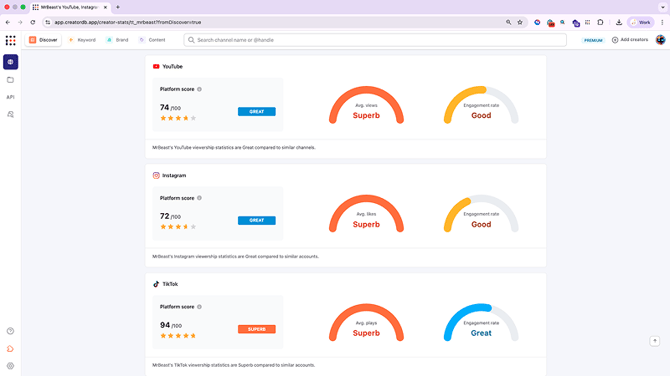
Account quality
The account quality dashboard presents an overview of the global performance of the creator’s social media accounts. The indicators used to measure platform performance are based on the creator’s average performance compared to similar channels.
Audience
This page will show the creator’s YouTube channel audience demographics, which are updated every 100 days. For details, see YouTube audience.
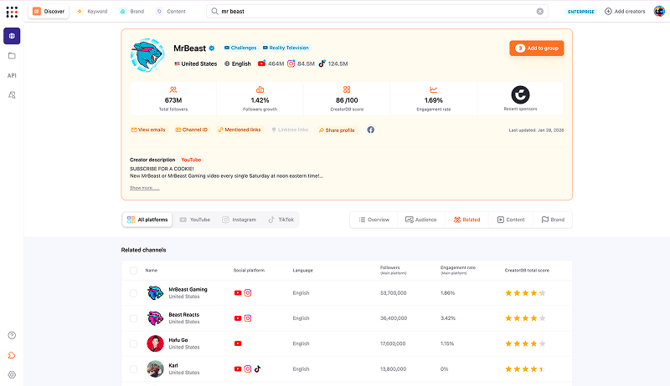
Related
This page lists similar creator accounts in CreatorDB’s database. The related accounts feature can help you find creators in the same field for collaboration purposes or competitor analysis.
Content
Shows the latest content that the creator has posted on various platforms, content analytics, trending content tags, and content categories. It considers the videos’ historical average performance on multiple platforms, such as YouTube, Instagram, and TikTok.
When you click on a recent video, it will show an overview of the video’s performance on its respective platforms. For details, see the following articles:
Content analytics
On the Content page, you can view the creator’s recently posted content from all platforms and get details on the content analytics for content posted on all platforms. The content analytics metrics measure the content performance and posting frequency over 12 months. Each bar on the graph represents a month.
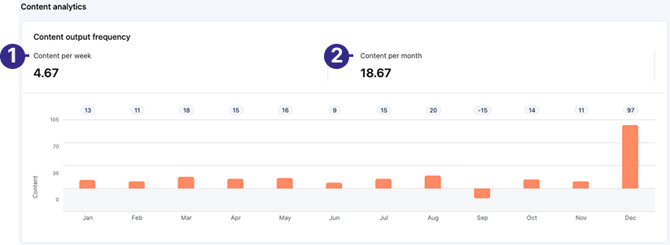
| No. | Label | Definition |
|---|---|---|
| 1 | Content per week | The total number of content posted weekly by the creator. |
| 2 | Content per month | The total number of content posted monthly by the creator. |
Content tags
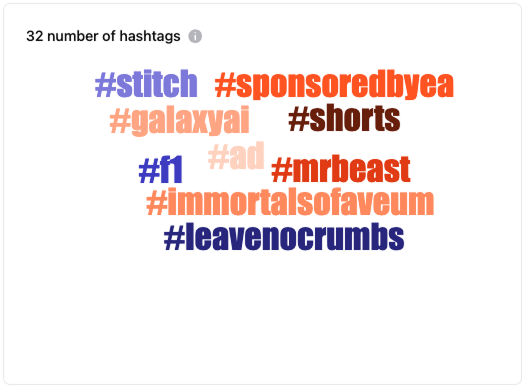
The most common hashtags in the creator’s uploaded content are displayed. There are six different font sizes to indicate the hashtag’s usage frequency. The larger the hashtag font, the higher the usage frequency. The platform can show up to 32 most frequently used hashtags by the creator in recent posts.
Top 5 topics from all platforms
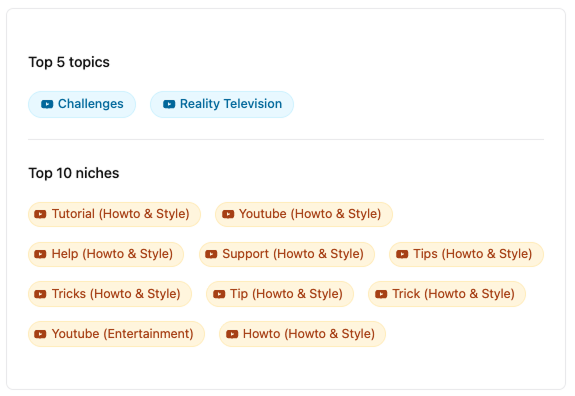
The top 5 topics out of 470 associated with the creator’s content are displayed. These topics are based on YouTube classifications.
Top 10 niches from all platforms
The top 10 niches of the content are displayed. Niches are subcategories of topics. Currently, CreatorDB supports up to 16,000 niches that are applied to classify creators.
Brand
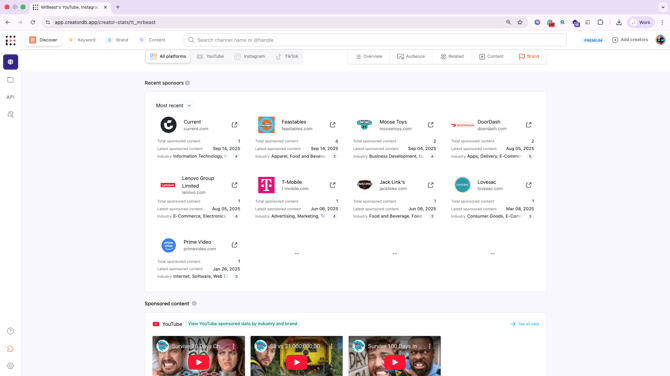
Select the Brand tab to view the creator’s video content sponsored by brands on YouTube and Instagram.
YouTube
On a creator profile page, you can view their YouTube channel performance by selecting the YouTube tab.
YouTube overview
By default, the creator profile page will show the Overview page of the selected platform. You can view a creator’s key YouTube performance statistics by going to a creator's profile page and then select the YouTube tab.
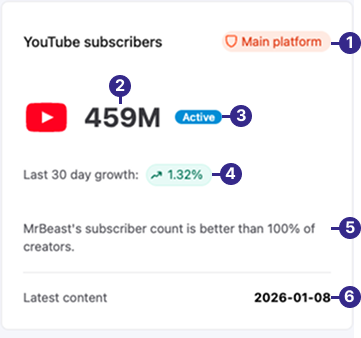
| No. | Label | Definition |
|---|---|---|
| 1 | Main platform | Indicates the creator’s primary social media platform. |
| 2 | Subscribers | Total YouTube subscribers. |
| 3 | Active | An indicator that shows the creator has been actively uploading content to their YouTube channel over the last 30 days. |
| 4 | Subscriber growth rate | The YouTube channel’s subscriber growth rate over 30 days. |
| 5 | Percentile performance | The YouTube channel’s performance percentage compared to the median value of similar channels. |
| 6 | Latest content | The last date the creator uploaded content to YouTube. |
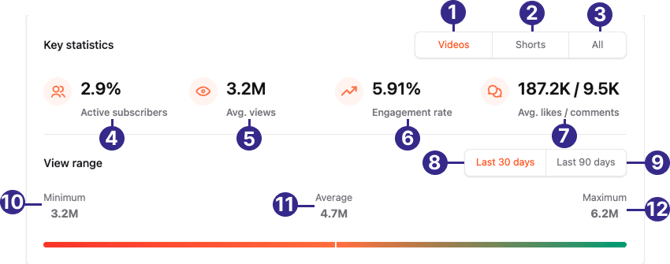
| No. | Label | Definition |
|---|---|---|
| 1 | Videos | Shows the key metrics performance for YouTube videos. |
| 2 | Shorts | Shows the key metrics performance for YouTube Shorts. |
| 3 | All | Shows the average key metrics performance from YouTube videos and shorts combined. |
| 4 | Active subscribers | Percentage of YouTube subscribers that are actively engaged over the past month. Active subscribers are calculated as: Average Video Views/subscribers |
| 5 | Avg. views | The average number of views videos have received over the past month. (Unit by the millions. M = 1,000,000) |
| 6 | Engagement rate | The percentage of engagement rate. |
| 7 | Avg. likes/ comments | The average number of likes and comments the creator’s YouTube videos received over the past month. (Unit by the thousands. K = 1,000) |
| 8 | Last 30 days | The creator’s YouTube content view range over the last 30 days, excluding content posted in the past 3 days. Content here refers to YouTube videos and shorts. |
| 9 | Last 90 days | The creator’s YouTube videos or shorts view range over the last 90 days, excluding content posted in the past 3 days. |
| 10 | Minimum | The minimum number of views the creator’s uploaded content received. |
| 11 | Average | The average number of views the creator’s uploaded content received. |
| 12 | Maximum | The maximum number of views the creator’s uploaded content received. |
Note: All units are measured by the thousands (k=1,000) or millions (M=1,000,000).
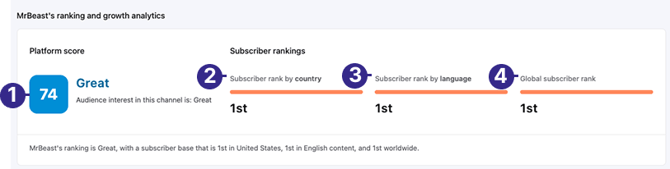
| No. | Label | Definition |
|---|---|---|
| 1 | CreatorDB score | The YouTube channel’s CreatorDB score. The unique score sums up the subscriber rankings, view rankings, engagement rankings, subscriber growth rates, video views growth rates, and the engagement growth rate and then finds the average. The calculations are in percentiles. |
| 2 | Rating | The CreatorDB score rating description. The ratings are superb (91 to 100), excellent (81 to 90), great (66 to 80), good (51 to 65), OK (26 to 50), and poor (0 to 25) |
| 3 | Subscriber rank by country | The subscriber rankings of the creator’s YouTube channel by country. |
| 4 | Subscriber rank by language | The subscriber rankings of the creator’s YouTube channel by language. |
| 5 | Global subscriber rank | The global subscriber rankings of the creator’s YouTube channel. |
You can also view line graphs showing average video views, subscribers, or engagement rate changes by weekly (7 days), monthly (30 days), or quarterly (90 days).
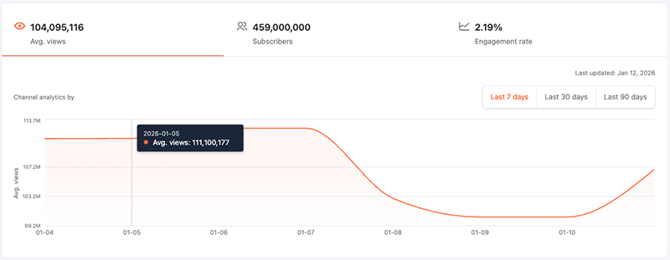
Channel analytics by average views for YouTube videos over a 7-day period.
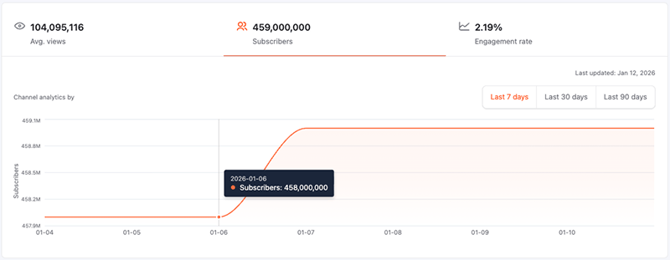
Channel analytics by changes in the number of YouTube subscribers over 7 days.
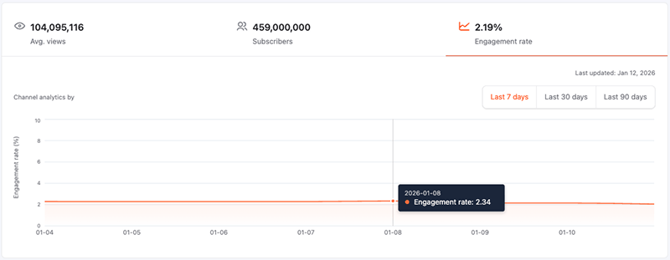
Channel analytics by changes in engagement rate over 7 days.
Additionally, you can view the growth rate changes for average views, subscribers, and engagement rate by weekly (7 days), monthly (30 days), or quarterly (90 days).
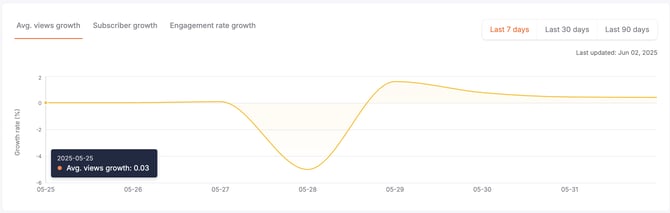
Average views growth rate over 7 days.
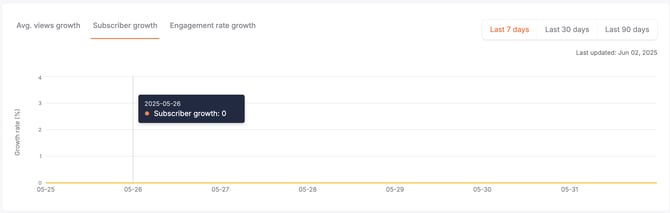
Subscriber growth rate over 7 days.
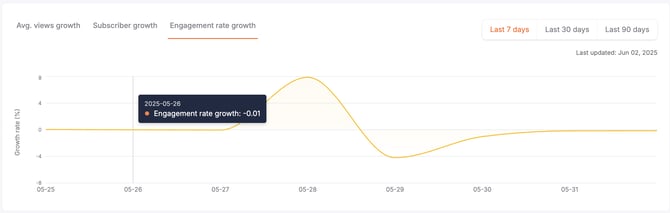
Engagement rate growth rate over 7 days.
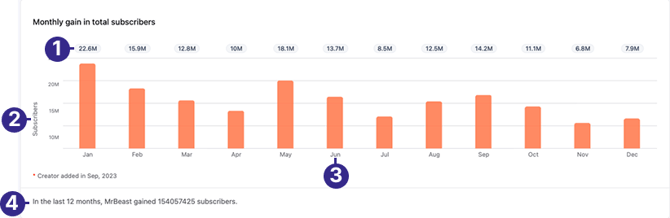
The monthly gain in total subscribers shows an increase or decrease in YouTube subscribers.
| No. | Label | Definition |
|---|---|---|
| 1 | Monthly gain in total subscribers | The gain in total subscribers for that month. |
| 2 | Subscribers | The number of subscribers growth or decline in thousands (1k = 1,000 and 1M = 1,000,000). |
| 3 | Months | The time by months. |
| 4 | Total subscriber growth | The creator’s total number of subscriber growth over 12 months. |
YouTube upload time (heat map)
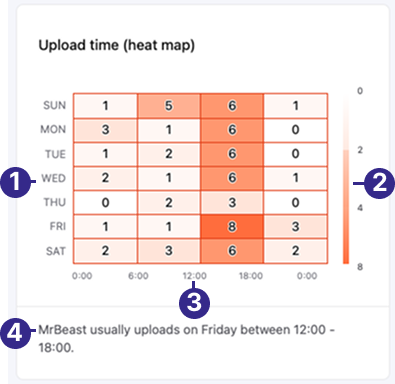
| No. | Label | Definition |
|---|---|---|
| 1 | Day | The day the creator uploads content throughout the week. |
| 2 | Number of content | The number of YouTube videos and shorts uploaded. The darker the shade, the more videos uploaded. |
| 3 | Time | The time in the day that content is uploaded. |
| 4 | Summary | A summary of the creator’s main content upload time. |
.png?width=670&height=327&name=Group_288_(1).png)
Here’s a breakdown of the latest 20 pieces of YouTube content uploaded within three months.
| No. | Label | Definition |
|---|---|---|
| 1 | YouTube shorts | The percentage of YouTube shorts out of content posted to their channel. |
| 2 | YouTube videos | The percentage of YouTube video out of all content posted to their channel. |
| 3 | Summary | A summary of the creator’s content breakdown in percentages. |
The channel quality dashboard presents the channel’s ranking metrics for different options based on six key indicators: average video views, average view growth, subscribers, subscriber growth rate, engagement rate, and engagement growth rate. It compares these different metrics against the median value of channels with the same topics. You can view these ranking metrics by country, language, or topics on YouTube.
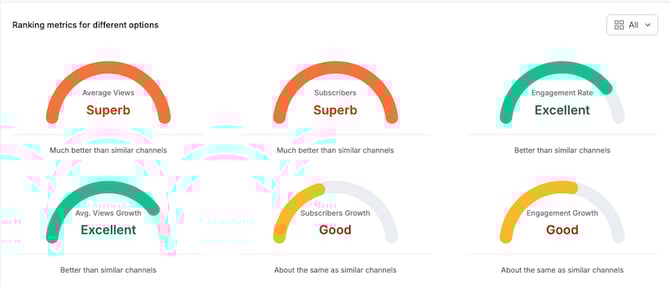
This image summarizes the YouTube channel’s ranking metrics for different options. The various metrics are based on the average for all ranking options.
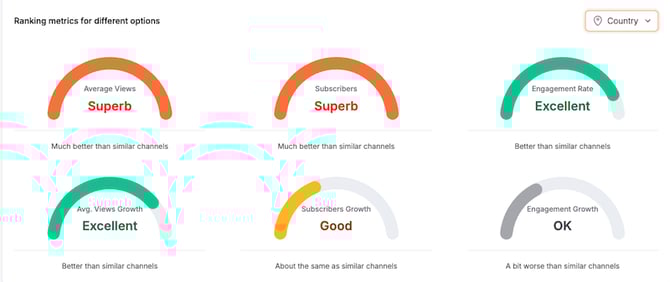
This image shows the YouTube channel’s ranking metric performance compared to other channels in the same country.
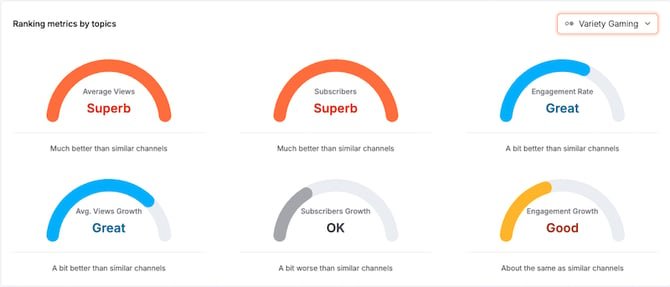
This image shows the YouTube channel’s ranking metric performance compared to other variety gaming channels. The various metrics are based on the average for all channels labeled with various gaming topics.
YouTube interquartile range
You can view the creator’s account or channel’s video performance interquartile range on the respective YouTube, Instagram, and TikTok tabs. The interquartile range measures the spread of the middle half of the distribution. It contains the middle half of the dataset in the distribution of a quartile segment, split into four equal parts from low to high. This indicator can give you an overview of the creator’s content views, ranging from the lowest, median, to the highest number of views.
The interquartile range is calculated for the average of the most recent 20 YouTube videos to analyze the interquartile range.
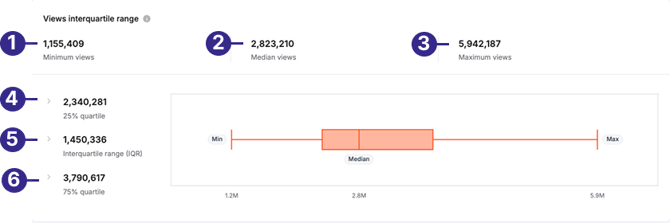
| No. | Label | Definition |
|---|---|---|
| 1 | Minimum views | The minimum number of YouTube video views on this creator’s channel. |
| 2 | Median views | The average number of views YouTube videos have received on the creator’s channel. |
| 3 | Maximum views | The maximum number of views YouTube videos have received on the creator’s channel. |
| 4 | 25% quartile | The number of views the bottom 25% of videos have received on this creator’s YouTube channel. |
| 5 | Interquartile range (IQR) | The median number of views the middle-ranking videos have received on this creator’s YouTube channel. |
| 6 | 75% quartile | The number of views the top 25% of videos have received on this creator’s YouTube channel. |
YouTube audience
On the YouTube > Audience page, you can view a creator’s YouTube audience demographics.
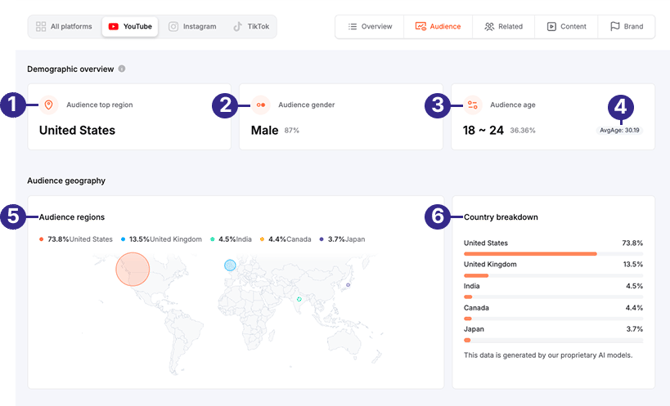
| No. | Label | Description |
|---|---|---|
| 1 | Audience top region | The primary region that the creator’s audience is from. |
| 2 | Audience gender | The prominent audience gender. |
| 3 | Audience age | The primary age group of the creator’s YouTube channel. Shows the percentage of audiences from this age group. |
| 4 | Average age | The audience’s average age. |
| 5 | Audience regions | The top five regions where the creator’s audience is from. |
| 6 | Country breakdown | The countries where most of the audience is from are generated by CreatorDB’s proprietary AI model. |
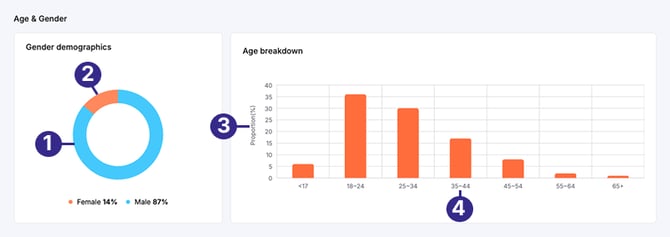
| No. | Label | Description |
|---|---|---|
| 1 | Male | The proportion of male audience for this creator’s channel. |
| 2 | Female | The proportion of female audience for this creator’s channel. |
| 3 | Proportion (%) | The percentage of the audience by different age brackets for this creator’s channel. |
| 4 | Age range | The audience age range for this creator’s channel. |
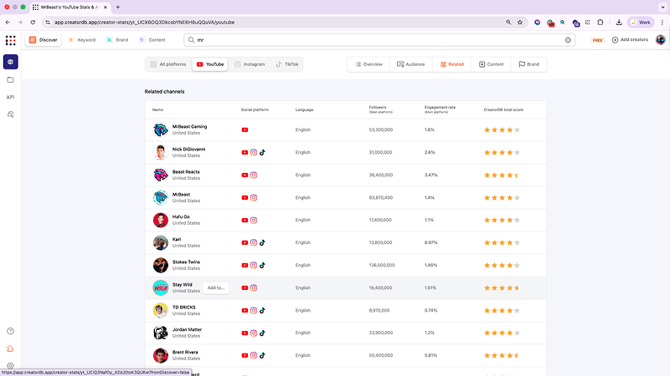
Related YouTube channels
On the YouTube > Related page, you can view a list of related YouTube creators that the system recommends based on the creator’s uploaded content.
YouTube content
On the Youtube > Content page, you can view the most recent YouTube videos uploaded to the creator’s channel on the content page. You can also scroll down the page to view the creator’s historical YouTube video performance and content analytics.
.png?width=670&height=578&name=Group_413_(1).png)
Note: The video views in the example screenshot are for reference only and do not reflect the actual video’s performance.
| No. | Label | Definition |
|---|---|---|
| 1 | Views | Total number of views this YouTube video received. (Note that 1K represents 1,000 views.) |
| 2 | Likes | The total number of likes this YouTube video received. |
| 3 | Engagement Rate | The engagement rate of this YouTube video. This is calculated as follows: (Likes + Comments)/Views |
| 4 | Comments | The total number of comments this YouTube video received. |
| 5 | Video Length | The length of this YouTube video in minutes. |
| 6 | Followers | The creator’s total number of YouTube subscribers. |
| 7 | 1 Day Views | The number of views this YouTube video received on the first day it was published. |
| 8 | 7 Day Views | The number of views the YouTube video received on the seventh day it was published. |
| 9 | 30 Day Views | The number of views the YouTube video received on the thirtieth day it was published. |
| 10 | Add to group | Add this creator to an existing group. |
| 11 | Published date | When the creator published the YouTube video. |
| 12 | Sponsored badge | A label that indicates if a brand or company has sponsored this YouTube video. |
| 13 | Sponsors | The sponsors of this YouTube video. |
| 14 | Content Quality | The quality indicators of this YouTube video are displayed in percentages. |
| 15 | Performance Metrics | The views performance of this YouTube video over time. |
YouTube content quality
The different gauges on the content quality dashboard provide an overview of the performance of specific video metrics. The possible gauge rankings are in descending order: superb, excellent, great, good, OK, and poor. For details, see CreatorDB score metrics.
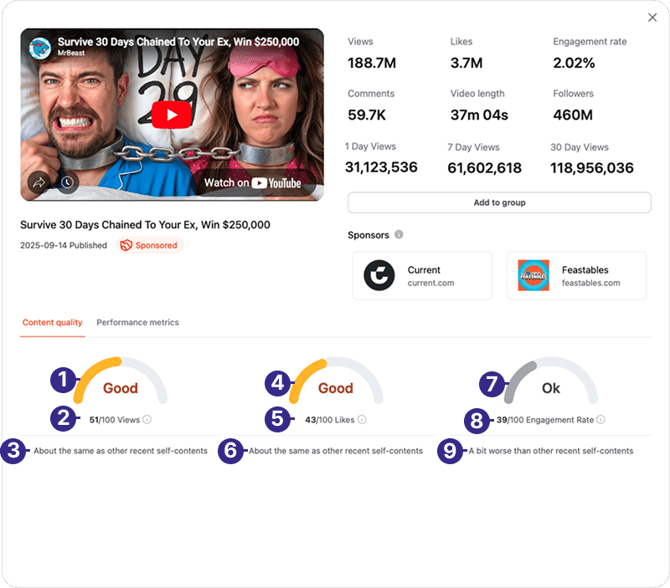
| No. | Metric label | Definition |
|---|---|---|
| 1 | Views gauge | An indicator that shows this YouTube video’s overall views performance and ranking. |
| 2 | Views score | The YouTube video’s views score out of 100. The higher the score, the better the performance. |
| 3 | Views performance | The YouTube video’s average views performance compared to the median value of the creator’s latest 20 YouTube posts in percentage. |
| 4 | Likes gauge | An indicator that shows this YouTube video’s overall likes performance and ranking. |
| 5 | Likes score | The YouTube video’s likes score out of 100. The higher the score, the better the performance. |
| 6 | Likes performance | The YouTube video’s average likes performance compared to the median value of the creator’s latest 20 YouTube posts in percentage. |
| 7 | Engagement rate gauge | An indicator that shows this YouTube video’s overall engagement rate performance and ranking. For details, see Platform statistics. |
| 8 | Engagement rate score | The YouTube video’s engagement rate score is out of 100. The higher the score, the better the performance. |
| 9 | Engagement rate performance | The YouTube video’s engagement rate performance compared to the median value of the creator’s latest 20 posts on YouTube. |
YouTube performance metrics
Obtains data from this YouTube video’s views within 90 days and plots at least 12 to 15 points on a line graph. The data is updated daily.
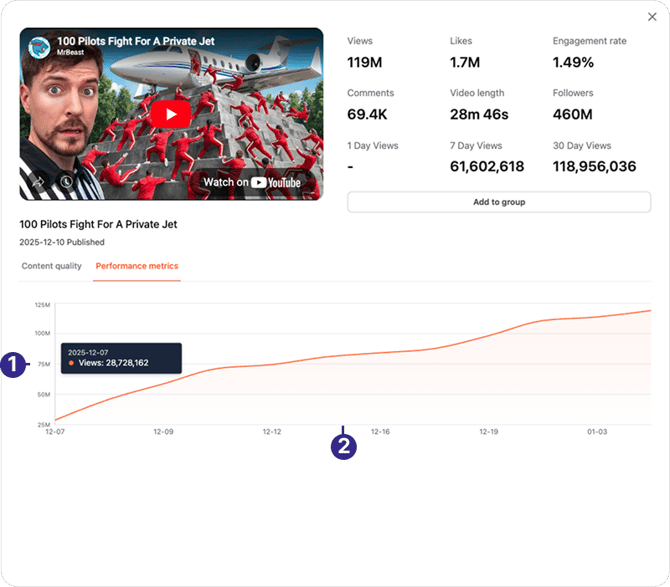
| No. | Metric label | Definition |
|---|---|---|
| 1 | Views | The number of views this YouTube video received. |
| 2 | Date | The dates over 90 days. |
YouTube content history
On the content history page, you can view the creator’s channel changes in average YouTube video views, average likes, average comments, average engagement rate, and average video length.
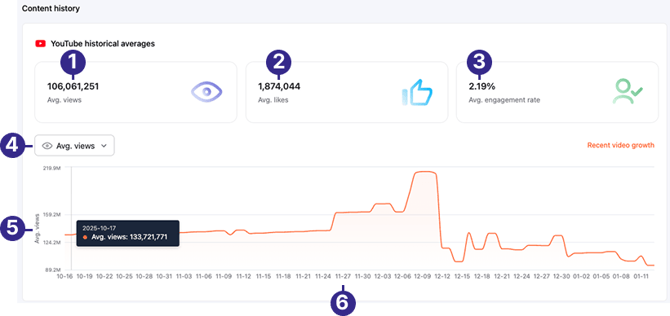
| No. | Label | Description |
|---|---|---|
| 1 | Avg. views | The average number of views this creator’s YouTube videos receive. |
| 2 | Avg. likes | The average number of likes this creator’s YouTube videos receive. |
| 3 | Avg. engagement rate | The average number engagement rate of this creator’s YouTube videos. |
| 4 | Drop-down menu | View the creator’s performance by average views, average likes, average comments, average engagement rate, or average video length over one year. The YouTube video engagement rate is (Likes + Comments)/Views. |
| 5 | Metrics | The selected YouTube video performance metric. The Y-axis of this line graph will display the relevant selected metric, such as views, likes, comments, video length or engagement rates. |
| 6 | Dates | The dates in 5-day intervals over one year. |
.png?width=670&height=261&name=Group_300_(1).png)
| No. | Label | Description |
|---|---|---|
| 1 | Category breakdown | The percentage of YouTube content posted by this creator by categories. |
| 2 | Content per week | The number of content this creator posts to their YouTube channel weekly. |
| 3 | Content per month | The number of content this creator posts to their YouTube channel monthly. |
| 4 | Average content | The average number of content that this creator posts per month. |
| 5 | Content | The number of published YouTube content. |
| 6 | Time | The period by months over one year. |
YouTube content tags
On the YouTube > Content page, you can view the 32 most frequently used hashtags in the creator’s uploaded YouTube content, their content’s top five topics and top 10 niches. For details, see Content tags.
YouTube brand
On the YouTube > Brand page, you can view the creator’s sponsored YouTube videos over one year. You can view detailed sponsored content performance, sponsoring brand industries, and recently sponsored content.
.png?width=670&height=516&name=Group_300_(2).png)
| No. | Label | Description |
|---|---|---|
| 1 | Sponsored videos | The total number of sponsored videos on this creator’s YouTube channel over one year. |
| 2 | Sponsored (percentage) | The percentage of sponsored videos out of total videos uploaded by the creator to their YouTube channel over one year. |
| 3 | Total videos | The total number of videos uploaded to this creator’s YouTube channel over one year. |
| 4 | Engagement rate (Sponsored content) | The average engagement rate of the creator’s sponsored YouTube content. |
| 5 | Avg. views (Sponsored content) | The average views the creator’s sponsored YouTube videos received. |
| 6 | Avg. likes (Sponsored content) | The average likes the creator’s sponsored YouTube videos received. |
| 7 | Avg. comments (Sponsored content) | The average comments the creator’s sponsored YouTube videos received. |
| 8 | Latest sponsored content (Sponsored content) | The date of the creator’s last uploaded sponsored YouTube video. |
| 9 | Engagement rate (Total content) | The average engagement rate of all the creator’s YouTube videos over one year. |
| 10 | Avg. views (Total content) | The average views of all the creator’s YouTube videos over one year. |
| 11 | Avg. likes (Total content) | The average likes of all the creator’s YouTube videos over one year. |
| 12 | Avg. comments (Total content) | The average comments of all the creator’s YouTube videos over one year. |
| 13 | Latest content | The date of the creator’s last updated video. |
| 14 | Industries | Lists the industry of all sponsored videos. You can sort sponsored videos by industries by clicking on an industry. |
| 15 | Drop-down menu | Sort the sponsoring brands by Most recent or Total sponsored content. |
| 16 | Brands | You can view the sponsoring brand’s basic information including their total sponsored content, latest sponsored content, and more. You can sort sponsored videos by the sponsoring brand by selecting a brand. For details, see Viewing a brand profile. |
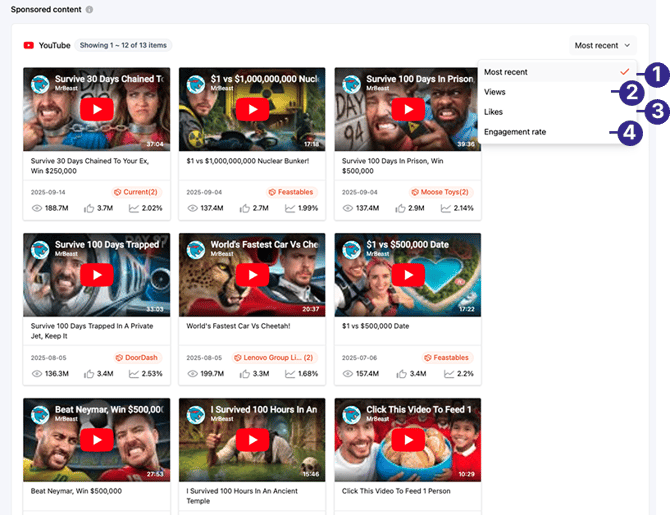
| No. | Label | Description |
|---|---|---|
| 1 | Most recent | Sorts the sponsored videos from latest to oldest. |
| 2 | Views | Sorts sponsored videos by number of views received in descending order. |
| 3 | Likes | Sorts sponsored videos by number of likes received in descending order. |
| 4 | Engagement rate | Sorts sponsored videos by engagement rate in descending order. The engagement rate for YouTube videos is calculated as follows: (Likes + Comments)/Views |
On a creator profile page, you can view their Instagram account performance by selecting the Instagram tab.
Instagram overview
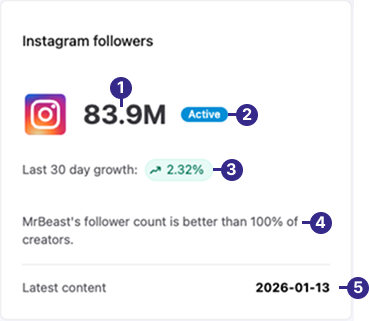
| No. | Label | Definition |
|---|---|---|
| 1 | Total number of followers | The total number of Instagram followers the creator has. (k= 1,000, M= 1,000,000) |
| 2 | Active | An indicator that shows the creator has been actively uploading content to their Instagram account over the last 30 days. |
| 3 | Follower growth rate | The creator’s Instagram follower growth rate over 30 days. |
| 4 | Performance percentage | The creator’s Instagram followers growth compared to the median value of similar channels. |
| 5 | Latest content | The last date the creator uploaded content onto Instagram. |
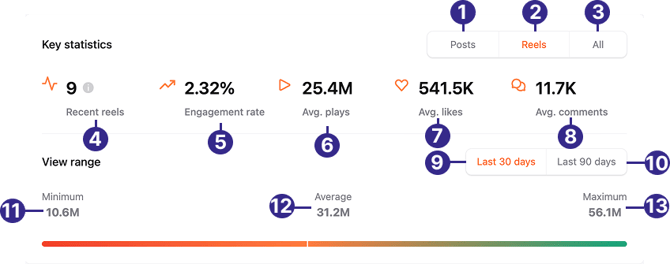
Note: The Views range feature currently only supports Instagram reels.
| No. | Label | Definition |
|---|---|---|
| 1 | Posts | Shows the key metrics performance for Instagram posts. |
| 2 | Reels | Shows the performance of the key metrics for Instagram reels. |
| 3 | All | Shows the performance of the key metrics for combined Instagram posts and reels. |
| 4 | Recent reels | The latest reels the creator has uploaded to Instagram. |
| 5 | Engagement rate | Measures how followers interact with the creator’s content on Instagram. The engagement rate on Instagram is: (Likes + Comments)/Followers |
| 6 | Avg. plays | The average number of times the Instagram reel was viewed. (Unit by the millions. M =1,000,000) |
| 7 | Avg. likes | The average number of likes the creator’s Instagram reels receive. (Unit by the thousands. k = 1,000) |
| 8 | Avg. comments | The average number of comments the creator’s Instagram reels received. |
| 9 | Last 30 days | The number of plays the creator’s Instagram reels received over the last 30 days, excluding reels published in the last 3 days. |
| 10 | Last 90 days | The number of plays the creator’s Instagram reels received over the last 90 days, excluding reels published in the last 3 days. |
| 11 | Minimum | The minimum number of plays the creator’s Instagram reels received. |
| 12 | Average | The average number of plays the creator’s Instagram reels received. |
| 13 | Maximum | The maximum number of plays the creator’s Instagram reels received. |
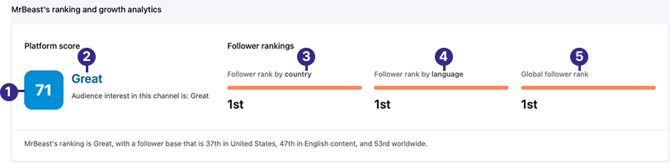
| No. | Label | Definition |
|---|---|---|
| 1 | CreatorDB score | The Instagram account’s CreatorDB score. The unique score sums up the followers’ rankings, view rankings, engagement rankings, followers’ growth rates, post views growth rates, and the engagement growth rate, and then the average is calculated. The calculations are in percentiles. |
| 2 | Account rating | The CreatorDB score rating description. The ratings are superb (91 to 100), excellent (81 to 90), great (66 to 80), good (51 to 65), OK (26 to 50), and poor (0 to 25). |
| 3 | Follower rank by country | The follower rankings of the creator’s Instagram account by country. |
| 4 | Follower rank by language | The follower rankings of the creator’s Instagram account by language. |
| 5 | Recent posts & reels | The latest posts and reels the creator has uploaded to Instagram. |
| 6 | Global follower rank | The global follower rankings of the creator’s Instagram account. |
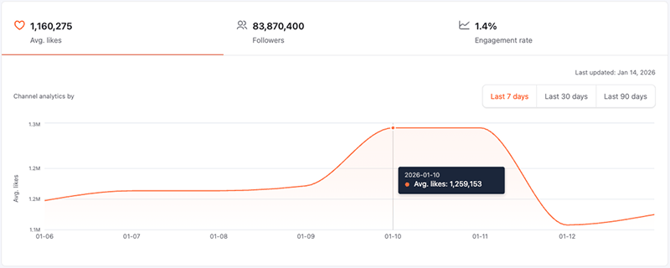
The average number of likes this Instagram account has received over the past 7 days.
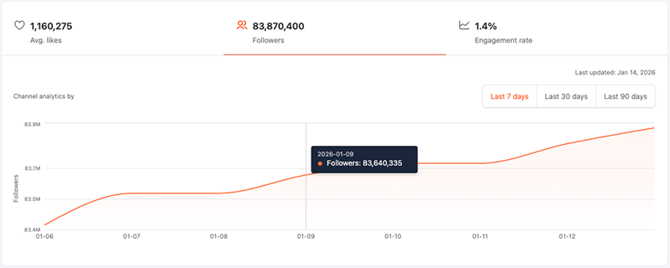
This Instagram account’s follower growth changes over the past 7 days.
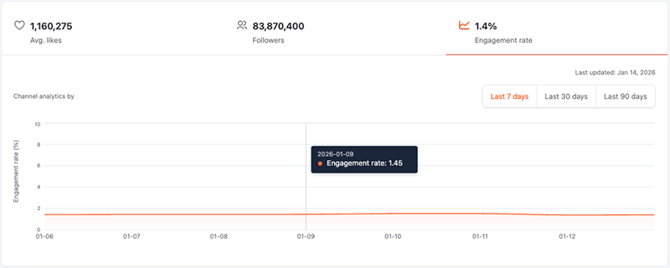
This Instagram account’s engagement rate changes over the past 7 days.
You can also view the changes in growth rates for average likes, followers, and engagement rates.
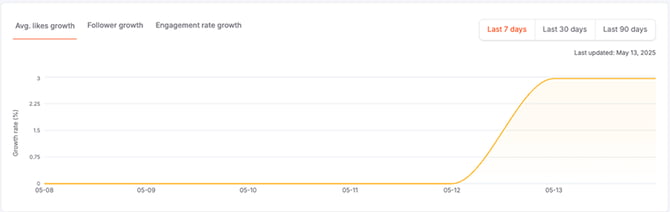
This Instagram account’s average likes growth rate changes over the past 7 days.
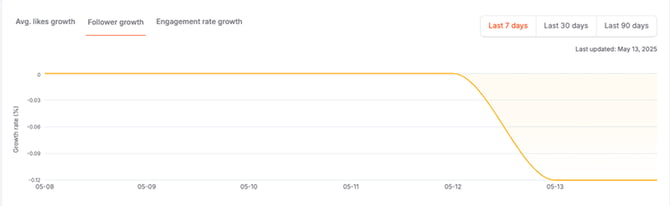
This Instagram account’s follower growth rate changes over the past 7 days.
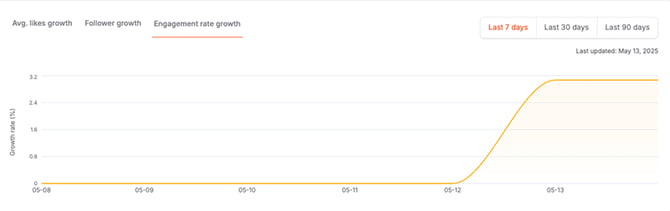
This Instagram account’s engagement growth rate changes over the past 7 days.
You can also view the changes in the creator’s Instagram followers over a month.
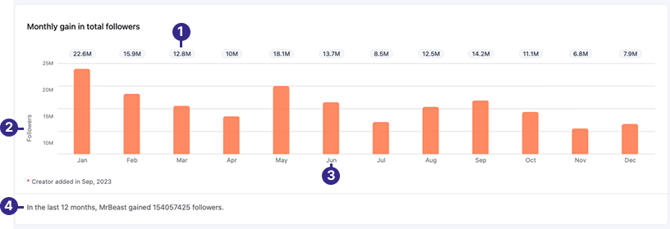
| No. | Label | Definition |
|---|---|---|
| 1 | Followers growth per month | The number of followers gained for this Instagram account for that month. |
| 2 | Followers | The number of followers. |
| 3 | Period | The months in a year. |
| 4 | Summary | A summary of the total number of Instagram followers the creator gained over one year. A negative number indicates the creator lost that amount of followers over a year. |
Instagram upload time (heat map)
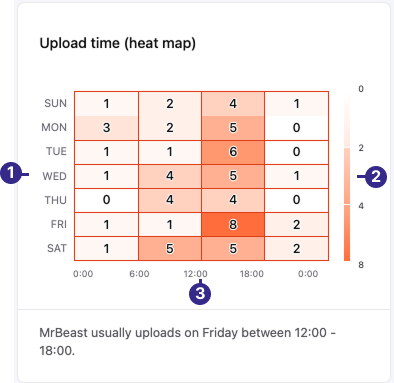
| No. | Label | Definition |
|---|---|---|
| 1 | Day | The days throughout the week. |
| 2 | Uploads | The number of Instagram content uploaded on this day and time. |
| 3 | Time | The times this creator published Instagram content throughout the day. |
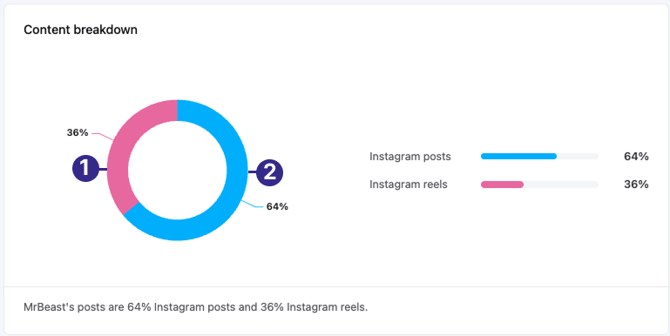
| No. | Label | Definition |
|---|---|---|
| 1 | Instagram reels | The percentage of Instagram reels uploaded to the creator’s account over 3 months. |
| 2 | Instagram posts | The percentage of Instagram posts uploaded to the creator’s account of the most recent 20 posts within three months. |
Instagram account quality
The account quality dashboard presents the account’s ranking metrics for different options by six key indicators: average likes, average likes growth, followers, followers growth rate, engagement rate, and engagement growth rate. The channel quality compares these different metrics against the median value of all Instagram accounts. You can view these ranking metrics by country, language, or view overall performance.
.png?width=670&height=268&name=Screenshot_2026-01-15_at_10.40.30_AM_1_(1).png)
This image summarizes the Instagram account’s ranking metrics for different options. The various metrics are based on the average for all ranking options.
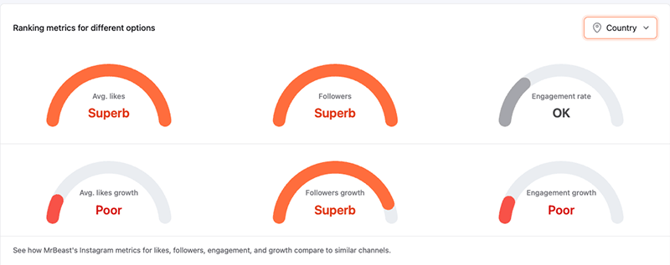
This image shows the Instagram account’s ranking metric performance compared to other accounts in the same country.
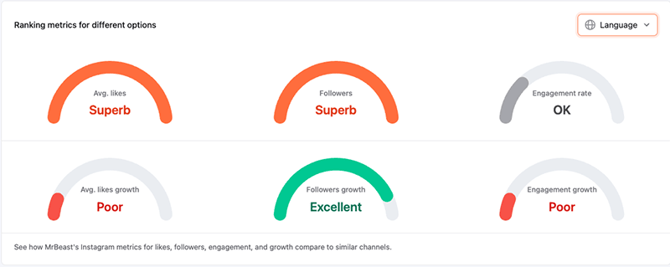
This image shows the Instagram account’s ranking metric performance compared to other accounts that use the same language.
Instagram interquartile range
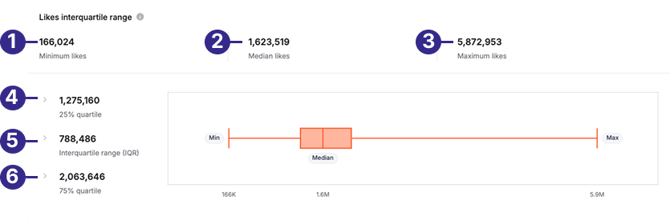
| No. | Label | Definition |
|---|---|---|
| 1 | Minimum likes | The minimum number of likes this creator’s Instagram account has received. |
| 2 | Median likes | The average number of likes this creator’s Instagram account has received. |
| 3 | Maximum likes | The maximum number of likes this creator’s Instagram account has received. |
| 4 | 25% quartile | The number of likes the bottom 25% of posts have received on this creator’s Instagram account. |
| 5 | Interquartile range (IQR) | The median number of likes the middle-ranking Instagram posts have received on the creator’s account. |
| 6 | 75% quartile | The number of likes the top 25% of posts have received on this creator’s Instagram account. |
Related Instagram accounts
On the Instagram > Related page, you can view the 20 most relevant Instagram accounts with a similar audience.
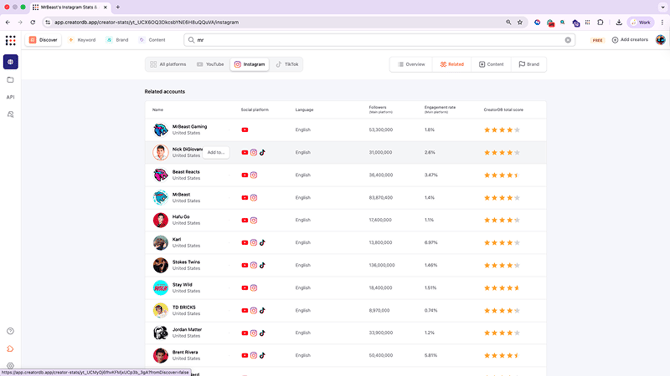
Instagram content
This page displays the latest content uploaded to Instagram and content analytics, such as average likes, comments, and engagement rates.
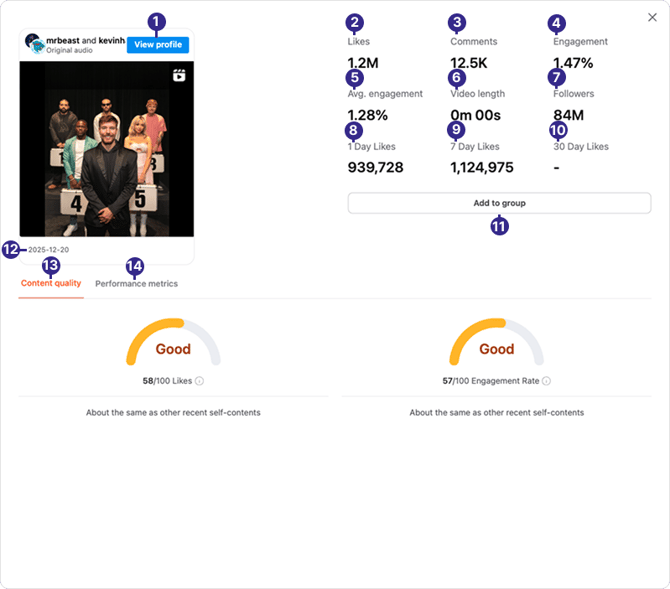
| No. | Label | Definition |
|---|---|---|
| 1 | View profile | The creator’s Instagram profile page. |
| 2 | Likes | The total likes an Instagram post receives. |
| 3 | Comments | The total comments the Instagram post received. |
| 4 | Engagement | The Instagram post’s engagement rate is calculated as follows: (Likes + Comments)/Followers |
| 5 | Avg. Engagement | The average engagement rate for the last 20 Instagram posts. |
| 6 | Video Length | The length of this Instagram post or reel in minutes. |
| 7 | Followers | The creator’s number of followers on Instagram. |
| 8 | 1 Day Likes | The total number of likes this Instagram post received when the creator posted it. |
| 9 | 7 Day Likes | The total number of likes this Instagram post received 7 days after the creator posted it. |
| 10 | 30 Day Likes | The total number of likes the Instagram post received 30 days after the creator posted it. |
| 11 | Add to group | Add this Instagram creator to a group. |
| 12 | Publish date | The date this post was published on Instagram. |
| 13 | Content Quality | This Instagram post’s quality is based on likes and engagement rates. |
| 14 | Performance Metrics | This Instagram post’s performance based on the number of likes received over 30 days. |
Instagram content quality
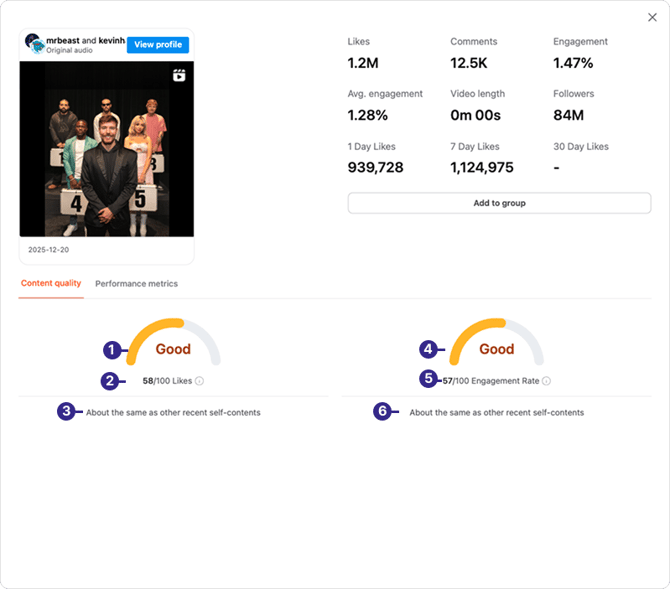
| No. | Metric Label | Definition |
|---|---|---|
| 1 | Likes rating | A gauge that shows this Instagram post’s likes performance and descriptive rating. |
| 2 | Likes score | This Instagram post’s likes score out of 100. |
| 3 | Comparison to median likes | This shows Instagram’s post likes performance in percentage compared to the median number of likes recent posts received. |
| 4 | Engagement rating | A gauge that shows this Instagram post’s engagement rate performance and descriptive rating. |
| 5 | Engagement rate score | This Instagram post’s engagement rate is out of a total score of 100. |
| 6 | Comparison to median engagement rate | This shows Instagram’s post engagement rate performance in percentage compared to the median engagement rate of recent posts. |
Instagram performance metrics
The total number of likes the Instagram post received over 90 days. This data is updated regularly depending on the creator’s size and sponsorship activities.
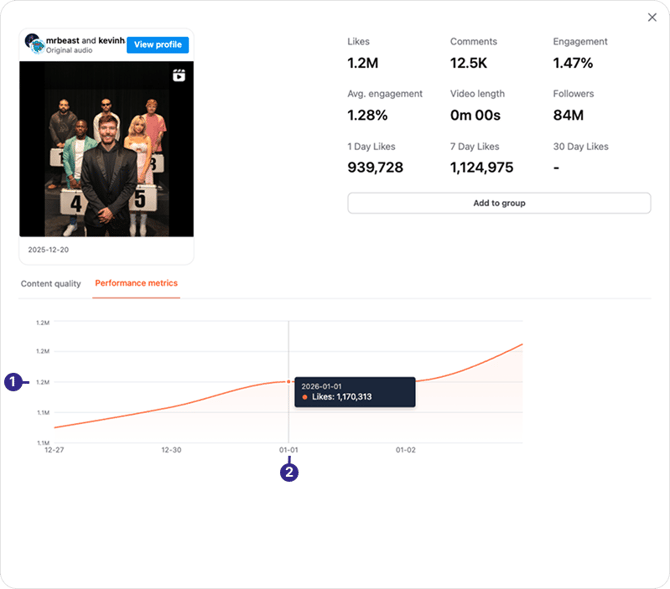
| No. | Label | Description |
|---|---|---|
| 1 | Likes | The number of likes the creator’s Instagram posts received. |
| 2 | Date | The dates over 30 days. |
Instagram content history
On the content history page, you can view the creator’s Instagram account changes in average likes, average comments, and average engagement rate over a year.
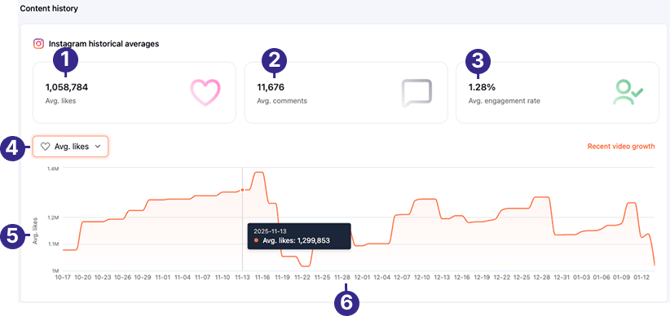
| No. | Label | Description |
|---|---|---|
| 1 | Avg. likes | The average number of likes this creator’s Instagram posts receive. |
| 2 | Avg. comments | The average number of comments this creator’s Instagram posts receive. |
| 3 | Avg. engagement rate | The average number engagement rate of this creator’s Instagram posts. |
| 4 | Drop-down menu | View the creator’s performance by average likes, average comments, and average engagement rate over one year. The Instagram post engagement rate is (Likes + Comments)/Views. |
| 5 | Metrics | The selected Instagram metric. The Y-axis of this line graph will display the relevant selected metric view, such as likes, comments, , and engagement rates. |
| 6 | Dates | The dates in 5-day intervals over one year. |
Instagram content analytics
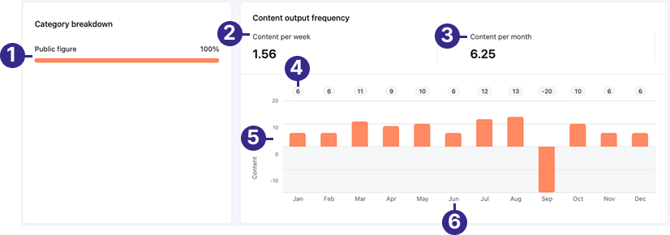
| No. | Label | Description |
|---|---|---|
| 1 | Category breakdown | A verified Instagram business account’s category. |
| 2 | Content per week | The number of Instagram posts published by this creator weekly. |
| 3 | Content per month | The number of Instagram posts this creator published monthly. |
| 4 | Pieces of content | The number of Instagram posts this creator published for that particular month. |
| 6 | Content | The number of Instagram posts and reels posted by this creator. |
| 7 | Date | The months over one year. |
Instagram content tags
You can view the top 32 most frequently used tags in the creator’s Instagram posts. Note that CreatorDB currently does not support the categorization of Instagram content by topics or niches.
.png?width=566&height=416&name=Screenshot_2026-01-15_at_1.38.21_PM_2_(1).png)
Instagram brand
You can view a creator’s sponsored Instagram videos at a glance on the CreatorDB platform. The dashboard displays the total number of Instagram videos that brands have sponsored, the date of the brand’s last sponsored video, and the brand’s industry.
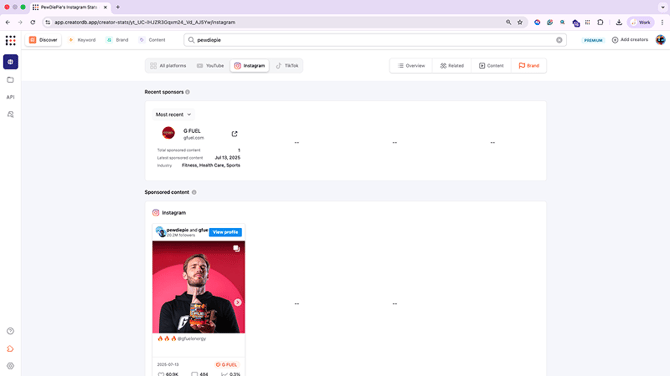
TikTok
On a creator profile page, you can view their TikTok account performance by selecting the TikTok tab.
TikTok overview
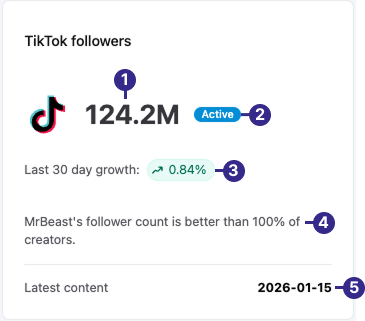
| No. | Label | Definition |
|---|---|---|
| 1 | Total number of followers | The total number of TikTok followers this creator has by the thousands. (k= 1,000, M= 1,000,000) |
| 2 | Active | An indicator that shows the creator has been actively uploading content to their TikTok account over the last 30 days. |
| 3 | Follower growth rate | This creator’s TikTok follower growth rate over 30 days. |
| 4 | Performance percentage | This creator’s TikTok followers growth compared to the median value of similar TikTok accounts. |
| 5 | Latest content | The last date the creator uploaded content onto TikTok. |
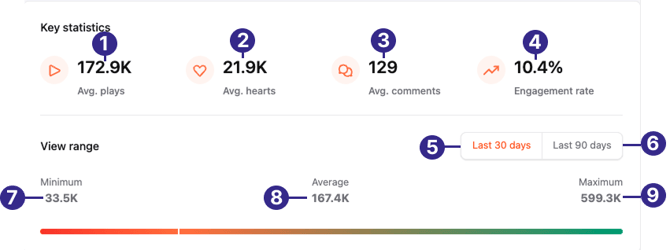
| No. | Label | Definition |
|---|---|---|
| 1 | Average plays | The average number of plays the creator’s TikTok posts receive. (Units by the thousands. k = 1,000) |
| 2 | Average hearts | The average number of hearts the creator’s TikTok posts receive. |
| 3 | Average comments | The average number of hearts the creator’s TikTok posts receive. |
| 4 | Engagement rate | The engagement rate of the creator’s TikTok posts is calculated by (Hearts + Comments + Shares)/Plays. |
| 5 | Last 30 days | The number of plays the creator’s TikTok posts received over 30 days, excluding posts published in the last 3 days. |
| 6 | Last 90 days | The number of plays the creator’s TikTok posts received over 90 days, excluding posts published in the last 3 days. |
| 7 | Minimum | The minimum number of plays the creator’s TikTok’s posts received. |
| 8 | Average | The average number of plays the creator’s TikTok’s posts received. |
| 9 | Maximum | The maximum number of plays the creator’s TikTok’s posts received. |
.png?width=670&height=163&name=Group_312_(1).png)
| No. | Label | Definition |
|---|---|---|
| 1 | TikTok platform score | The creator’s percentile ranking on TikTok. This unique value is calculated using the following metrics: Number of followers, followers growth, engagement rate, engagement growth rate, average plate, and average growth rate. |
| 2 | Account rating | The CreatorDB score rating description. The ratings are superb (91 to 100), excellent (81 to 90), great (66 to 80), good (51 to 65), OK (26 to 50), and poor (0 to 25) |
| 3 | Follower rank by country | The follower rankings of the creator’s TikTok account by country. |
| 4 | Follower rank by language | The follower rankings of the creator’s TikTok account by language. |
| 5 | Global follower rank | The global follower rankings of the creator’s TikTok account. |
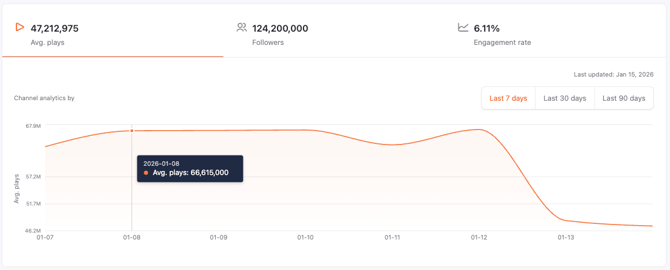
The average number of plays this creator’s TikTok videos received over the past 7 days.
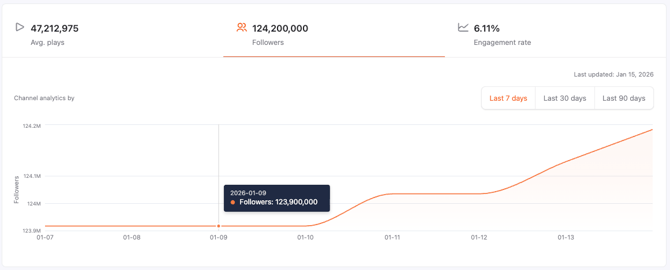
The change in the number followers of this creator’s TikTok account over the past 7 days.
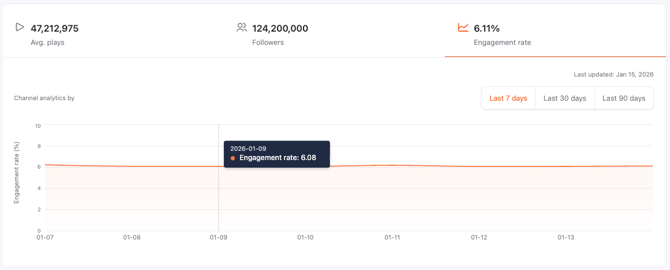
The creator’s TikTok videos’ engagement rate changes over the past 7 days.
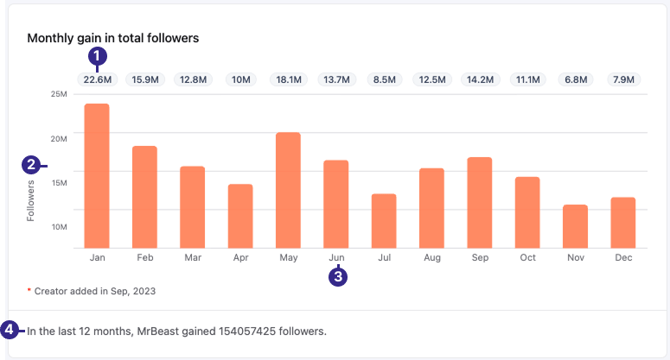
| No. | Label | Definition |
|---|---|---|
| 1 | Followers growth per month | The number of followers gained for this TikTok account for that month. |
| 2 | Followers | The number of followers. |
| 3 | Period | The months in a year. |
| 4 | Summary | A summary of the change in the total number of followers of this creator’s TikTok account over 12 months. |
TikTok upload time (heat map)
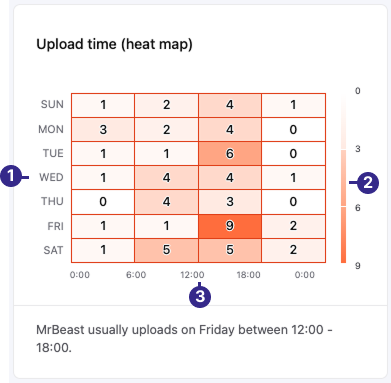
| No. | Label | Definition |
|---|---|---|
| 1 | Day | The days throughout the week. |
| 2 | Uploads | The number of TikTok videos uploaded on this day and time. |
| 3 | Time | The times this creator published TikTok videos throughout the day. |
TikTok account quality
The account quality dashboard presents the account’s ranking metrics for different options by six key indicators: average plays, average plays growth, followers, followers growth rate, engagement rate, and engagement growth rate. The channel quality compares these different metrics against the median value of all TikTok accounts. You can view these ranking metrics by country, language, or view overall performance.
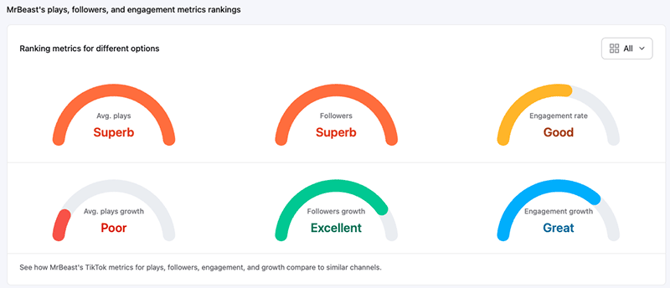
This image summarizes this creator’s TikTok account’s ranking metrics for different options. The various metrics are based on the average for all ranking options.
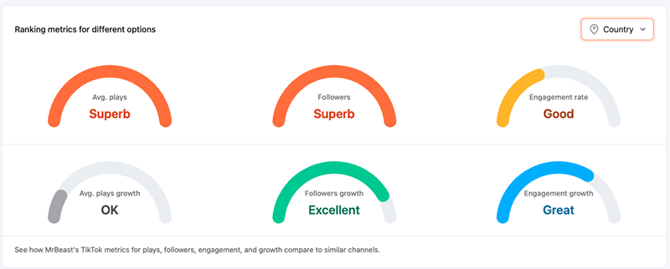
This image shows this creator’s TikTok account ranking metric performance compared to other accounts in the same country.
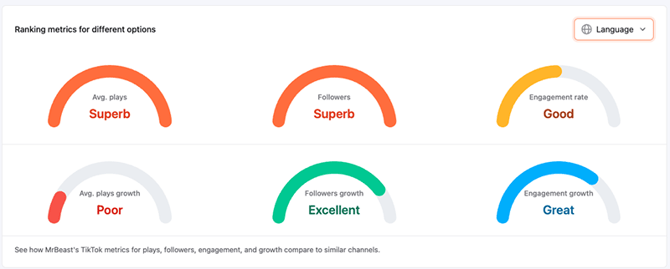
This image shows the creator’s TikTok account ranking metric performance compared to other accounts that use the same language.
TikTok interquartile range
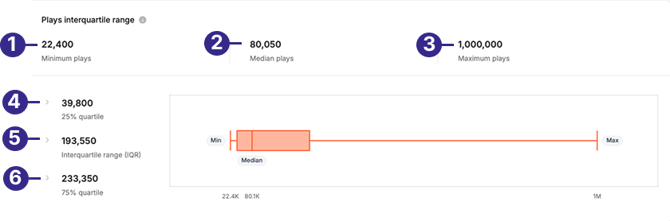
| No. | Label | Definition |
|---|---|---|
| 1 | Minimum plays | The minimum number of plays this creator’s TikTok videos have received. |
| 2 | Median plays | The average number of plays this creator’s TikTok videos have received. |
| 3 | Maximum plays | The maximum number of plays this creator’s TikTok video has received. |
| 4 | 25% quartile | The number of plays the bottom 25% of videos have received on this creator’s TikTok account. |
| 5 | Interquartile range (IQR) | The median number of plays the middle-ranking videos have received on this creator’s TikTok account. |
| 6 | 75% quartile | The number of plays the top 25% of videos have received on this creator’s TikTok account. |
Related TikTok accounts
On the TikTok > Related page, you can view a list of related TikTok creators that the system recommends based on the creator’s uploaded content.
TikTok content
You can view changes in TikTok’s historical average plays (views), average hearts, average comments, and average engagement rate. You can also view the creator’s content analytics to understand content production consistency better.
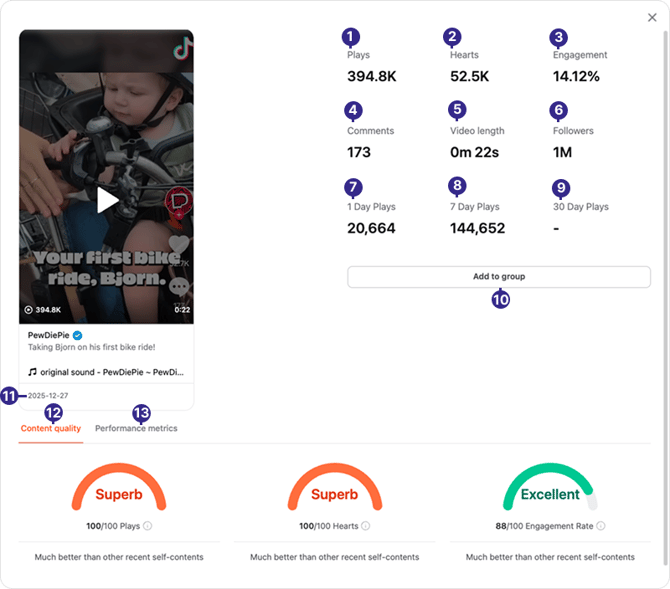
| No. | Label | Definition |
|---|---|---|
| 1 | Plays | The number of plays this TikTok video received. |
| 2 | Hearts | The number of hearts this TikTok video received. |
| 3 | Engagement | The engagement rate of this TikTok video. For TikTok videos, the engagement rate is: (Hearts + Comments + Shares)/Plays |
| 4 | Comments | The number of comments this TikTok video received. |
| 5 | Video length | The length of this TikTok video. |
| 6 | Followers | The total followers this creator’s TikTok account has. |
| 7 | 1 Day Plays | This TikTok video’s total number of plays received when the creator posted it. |
| 8 | 7 Day Plays | This TikTok video’s total number of plays received 7 days after the creator posted it. |
| 9 | 30 Day Plays | This TikTok video’s total number of plays received 30 days after the creator posted it. |
| 10 | Add to group | Add this TikTok creator to a group. |
| 11 | Date | The date this TikTok video was posted by the creator. |
| 12 | Content quality | This TikTok video’s quality is based on respectively the number of plays and hearts it received and it’s engagement rate. |
| 13 | Performance metrics | The performance of this TikTok video is based on the number of plays it received over 30 days. |
TikTok content quality
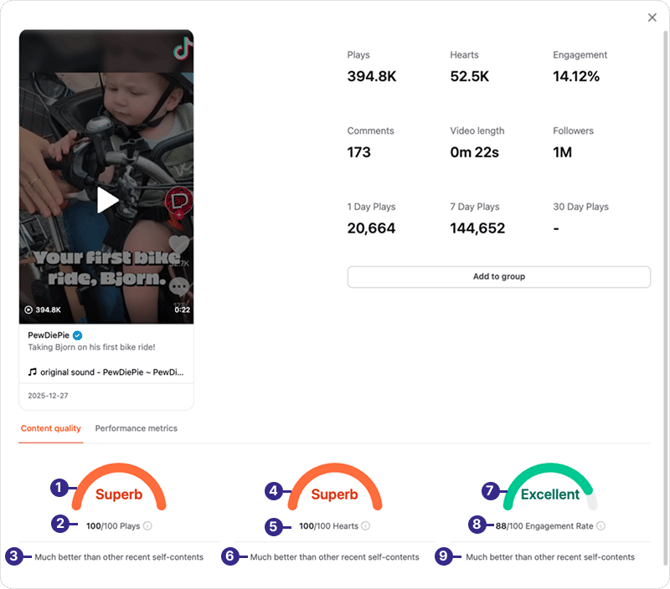
| No. | Label | Definition |
|---|---|---|
| 1 | Plays rating | A gauge that shows this TikTok video’s plays performance and descriptive rating. |
| 2 | Plays score | This TikTok video’s plays score out of 100 points. |
| 3 | Comparison to median plays | This shows TikTok video’s play performance in percentage compared to the median number of plays this creator’s last 20 TikTok videos received. |
| 4 | Hearts rating | A gauge that shows this TikTok video’s heart performance and descriptive rating. |
| 5 | Hearts score | This TikTok video’s hearts score out of a total of 100 points. |
| 6 | Comparison to median hearts | This shows TikTok video’s hearts performance in percentage compared to median number of hearts this creator’s last 20 TikTok videos received. |
| 7 | Engagement rating | A gauge that shows this TikTok video’s engagement rate performance and descriptive rating. |
| 8 | Engagement rate score | This TikTok video’s engagement rate score out of 100 points. |
| 9 | Comparison to median engagement rate | This shows the TikTok video’s engagement rate performance in percentage compared to the median engagement rate of this creator’s last 20 TikTok videos. |
TikTok performance metrics
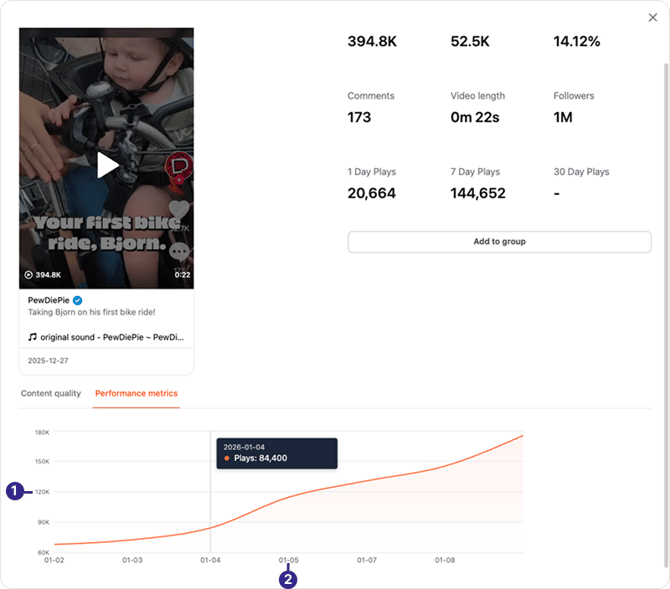
The number of plays the TikTok video received over 90 days. Up to 15 data points are plotted as a line graph, and the data is updated daily.
| No. | Label | Definition |
|---|---|---|
| 1 | Plays | The number of plays this TikTok video received. |
| 2 | Date | The dates over 90 days. |
TikTok content history
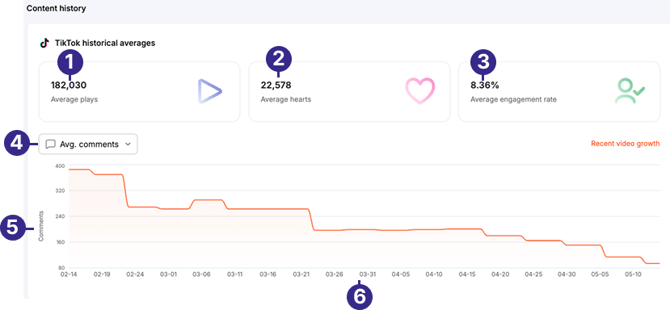
| No. | Label | Definition |
|---|---|---|
| 1 | Average plays | The average number of plays this creator’s TikTok videos have received. |
| 2 | Average hearts | The average number of hearts this creator’s TikTok videos have received. |
| 3 | Average engagement rate | The average engagement rate of this creator’s TikTok videos. |
| 4 | Drop-down menu | A drop-down menu allows you to view the TikTok content history by average comments, average plays, average hearts, and engagement rates. |
| 5 | Metrics | The selected TikTok video metric. The Y-axis of this line graph will display the relevant selected metric view, such as plays, hearts, and engagement rates. |
| 6 | Dates | The dates over 90 days. |
TikTok content analytics
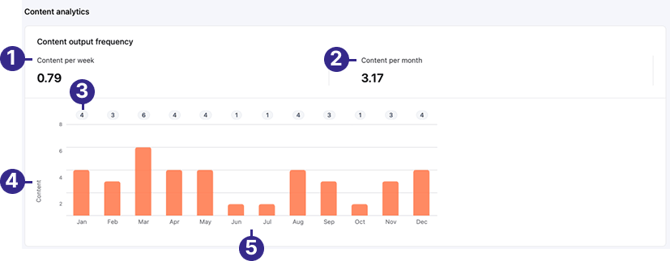
| No. | Label | Definition |
|---|---|---|
| 1 | Content per week | The number of TikTok videos this creator posted weekly. |
| 2 | Content per month | The number of TikTok videos this creator posted monthly. |
| 3 | Average pieces of content | The average pieces of TikTok content this creator posted over one year. |
| 4 | Content | The number of TikTok videos posted by this creator. |
| 5 | Time | The months over one year. |
Downloading creator profiles
You can download up to 1,500 creator profiles on the same page each time.
Important:
-
The system will download all creator profiles on the same page.
- The system currently does not support downloading selected creators. To download only selected creators, add them to a group and download the group. For details, see Downloading creators in a group.
- You can cancel the download anytime by clicking Cancel.
-
Log in to CreatorDB.
-
Search for creators. For details, see Searching for creators.
-
Click Download.
Downloading all creator profiles on the same page may take a few minutes..png?width=670&height=419&name=Group_327_(1).png)