.svg)
You can search for brands that have collaborated and sponsored creators. Find out which creators and platforms competing brands are sponsoring and their sponsored content performance using the CreatorDB platform. Aside from conducting competitor analysis, the Brand page also allows you to gain insight into creators sponsored content performance.
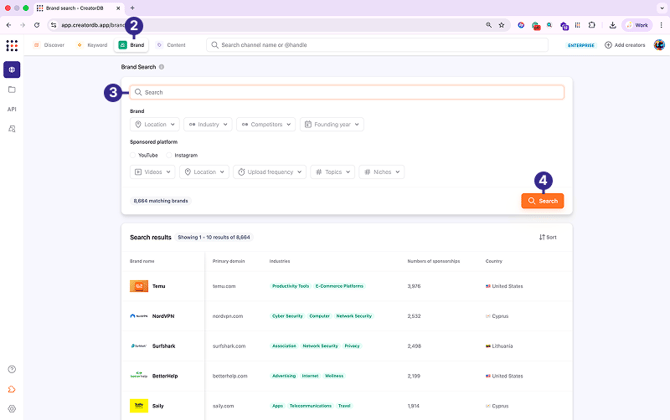
Searching for brands by keywords
- Log in to CreatorDB.
- Go to Search→ Brand.
- Enter a keyword.
- Click Search.
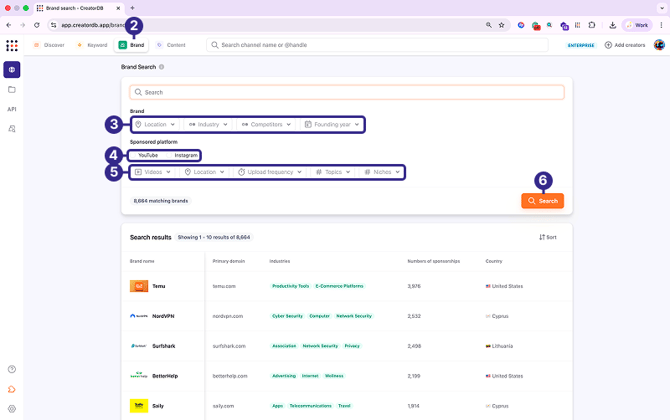
Searching for brands by filters
- Log in to CreatorDB.
- Go to Search→ Brand.
- Select brand filters.
- Optional: Select a sponsored platform.
- Optional: Select the sponsored platform filters.
- Click Search.
Viewing a brand’s profile
- Log in to CreatorDB.
- Go to Search→ Brand.
- Go to Search results and select a brand.
You can view the following information:
Viewing the brand profile information
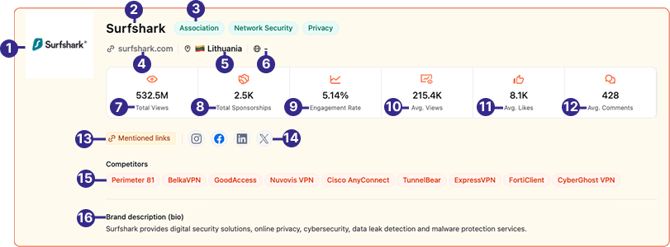
| No. | Label | Description |
|---|---|---|
| 1 | Brand logo | The brand’s logo. |
| 2 | Brand name | The brand’s name. |
| 3 | Industries | The industries that the brand operates in. |
| 4 | Domain | The web domain of the brand’s official website. |
| 5 | Country | The country of the brand. |
| 6 | Language | The language of the brand. |
| 7 | Total Views | The total views the brand’s sponsored content received. |
| 8 | Total Sponsorships | The total number of sponsorships the brand has sponsored. |
| 9 | Engagement Rate | The average engagement rate of the brand’s sponsored content. |
| 10 | Avg. Views | The average number of views the brand’s sponsored content received. |
| 11 | Avg. Likes | The average number of likes the brand’s sponsored content received. |
| 12 | Avg. Comments | The average number of comments the brand’s sponsored content received. |
| 13 | Mentioned links | The brand’s mentioned links. |
| 14 | Social media accounts | The brand’s social media accounts. |
| 15 | Competitors | The brand’s top competitors. |
| 16 | Brand description | The brand’s description. |
Viewing brand overview statistics
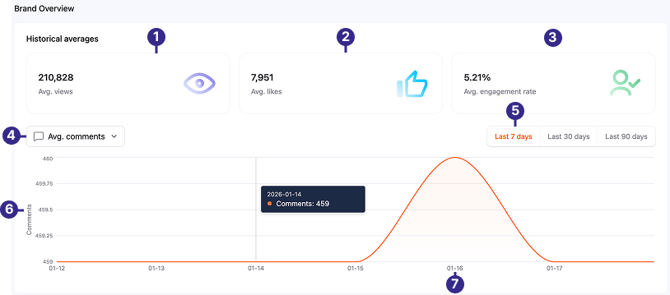
| No. | Label | Description |
|---|---|---|
| 1 | Avg. views | View the changes in the average number of views the brand’s sponsored content received over a year. |
| 2 | Avg. likes | View the changes in the average number of likes the brand’s sponsored content received over a year. |
| 3 | Avg. engagement rate | View the changes in the average engagement rate of the brand’s sponsored content over a year. |
| 4 | Drop-down menu | Select a metric from the drop-down menu to view the brand’s sponsored content’s historical performance over the specified period. Supported metrics include average views, average likes, average comments, and average engagement rate. |
| 5 | Period range | Click on a tab to specify the period of sponsored content’s historical performance that you would like to view. You can view a selected metric’s performance over 7 days, 30 days, and 90 days performance. |
| 6 | Metric | Shows the selected brand sponsored content performance metric, for example the number of views, likes, comments, or engagement rates. |
| 7 | Date | The date. |
Viewing recently sponsored channels
You can view the brand’s recently sponsored creators and their performance metrics.
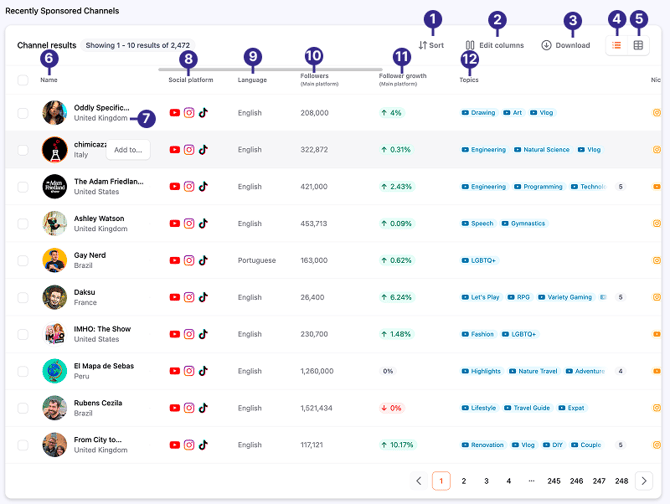
| No. | Label | Description |
|---|---|---|
| 1 | Sort | The brand’s logo. |
| 2 | Edit columns | You can select which columns to show in the table. |
| 3 | Download | Download the list of creators that have been sponsored by the brand. Note that only results on one page are downloaded at a time. |
| 4 | Table list | By default, the sponsored creator results are displayed in the table list view. In the table list view, you can show or hide information in certain columns. |
| 5 | Horizontal card | The horizontal card view displays the sponsored creators information in a card format. It shows key creator performance metrics, such as follower growth, engagement rate, CreatorDB total score, and Avg. views. It also will show the creator’s latest two videos that were sponsored by the brand. You cannot modify the displayed creator information in this view mode. |
| 6 | Name | The sponsored creator’s name. |
| 7 | Country | The sponsored creator’s country of origin. |
| 8 | Social platform | The social media platforms that the sponsored creator is active on. |
| 9 | Language | The sponsored creator’s primary language. |
| 10 | Followers (Main platform) | The sponsored creator’s number of followers on the social media platform that they are most active on. |
| 11 | Follower growth (Main platform) | The sponsored creator’s follower growth rate on their main social media platform over one year. |
| 12 | Topics | The main content topics of the sponsored creator. |
Viewing sponsored contents
You can view the latest YouTube and Instagram posts sponsored by this brand and view their performance. For details, see YouTube brand and Instagram brand.